
Learning Objectives – after this chapter you will be able to:
- Send HTML form data to a PHP script and read it with
$_POST,$_GETand$_REQUEST. - Choose between the GET and POST methods.
- Safely display user input with
htmlspecialchars(). - Build a self-processing form and handle checkboxes, radio buttons and select lists.
Forms and PHP
The most important thing to notice when dealing with HTML forms and PHP is that any form element in an HTML page is automatically available to your PHP scripts. The name attribute of each field becomes the key in the superglobal array $_POST or $_GET.
The example below contains an HTML form with two input fields and a submit button:
<html>
<body>
<form action="welcome.php" method="post">
Name: <input type="text" name="fname">
Age: <input type="text" name="age" size="4">
<input type="submit">
</form>
</body>
</html>

When a user fills out the form and clicks the submit button, the form data is sent to the PHP file welcome.php:
<html>
<body>
Welcome <?php echo $_POST["fname"]; ?>!<br>
You are <?php echo $_POST["age"]; ?> years old.
</body>
</html>
Welcome John!
You are 28 years old.
The GET Method and $_GET
The built-in $_GET array collects values from a form sent with method="get". Information sent with GET is visible to everyone – it is displayed in the browser's address bar – and there is a limit on the amount of information.
<form action="welcome_get.php" method="get">
Name: <input type="text" name="fname">
Age: <input type="text" name="age" size="4">
<input type="submit">
</form>

When the user clicks "Submit", the URL sent to the server looks like this:
http://localhost/phpbook/ch11/welcome_get.php?fname=Peter&age=37
The welcome_get.php file uses $_GET to collect the form data (the names of the form fields automatically become the keys of the $_GET array):
Welcome <?php echo $_GET["fname"]; ?>.<br>
You are <?php echo $_GET["age"]; ?> years old!
Welcome Peter.
You are 37 years old!
When to use method="get"
- All variable names and values are displayed in the URL, so the page can be bookmarked – useful for search pages and links.
- Never use GET to send passwords or other sensitive information.
- GET is not suitable for large values; keep URLs under about 2000 characters.
The POST Method and $_POST
The built-in $_POST array collects values from a form sent with method="post". Information sent with POST is invisible to others (it travels in the body of the HTTP request) and has no practical limit on the amount of information.
There is a maximum size for POST data, set by post_max_size in php.ini (XAMPP: 40M; PHP's own default is 8M). File uploads are also limited by upload_max_filesize.
When the user submits a POST form the URL shows only http://localhost/phpbook/ch11/welcome.php.
When to use method="post"
- For passwords, personal data, large text and file uploads.
- For actions that change data – inserting, updating or deleting records.
- Because the variables are not in the URL, the page cannot be bookmarked.
The $_REQUEST Array
$_REQUEST contains the contents of $_GET, $_POST and $_COOKIE, so it can collect form data sent with either method:
Welcome <?php echo $_REQUEST["fname"]; ?>!<br>
You are <?php echo $_REQUEST["age"]; ?> years old.
Welcome Meera!
You are 24 years old.
GET – data in the URL, visible, bookmarkable, size-limited, for reading/searching. POST – data in the request body, not visible in the URL, not bookmarkable, large data and files, for sending and changing data.
Displaying User Input Safely
Never echo user input directly. If a visitor types HTML or JavaScript – for example <script>alert('hi')</script> – it would run in the browser of everyone who views the page (Cross-Site Scripting, XSS). htmlspecialchars() converts <, >, &, " and ' into HTML entities so that the text is displayed, not executed.
<?php
$msg = $_GET['msg'] ?? '';
echo "Unsafe length of input: " . strlen($msg) . "<br>";
echo "Safe display: " . htmlspecialchars($msg);
?>
Unsafe length of input: 38
Safe display: <b>Hello</b> <script>alert(1)</script>
A Self-Processing Form
A form can post to itself. The script checks whether the form has been submitted; if not, it shows the form, otherwise it processes the data. $_SERVER['PHP_SELF'] (escaped with htmlspecialchars()) gives the address of the current script.
<?php
$name = $course = $gender = "";
$hobbies = [];
if ($_SERVER["REQUEST_METHOD"] == "POST") {
    $name    = htmlspecialchars($_POST["name"] ?? "");
    $course  = htmlspecialchars($_POST["course"] ?? "");
    $gender  = htmlspecialchars($_POST["gender"] ?? "");
    $hobbies = $_POST["hobby"] ?? [];          // checkboxes arrive as an array
}
?>
<html><body style="font-family:Arial;font-size:13px">
<form method="post" action="<?= htmlspecialchars($_SERVER['PHP_SELF']) ?>">
  Name: <input type="text" name="name" id="n" value="<?= $name ?>"><br>
  Course:
  <select name="course" id="c">
    <option>BCA</option><option>MCA</option><option>B.Tech</option>
  </select><br>
  Gender:
  <input type="radio" name="gender" value="Male" id="g1">Male
  <input type="radio" name="gender" value="Female" id="g2">Female<br>
  Hobbies:
  <input type="checkbox" name="hobby[]" value="Reading" id="h1">Reading
  <input type="checkbox" name="hobby[]" value="Music" id="h2">Music
  <input type="checkbox" name="hobby[]" value="Cricket" id="h3">Cricket<br>
  <input type="submit" value="Register" id="s">
</form>
<?php if ($_SERVER["REQUEST_METHOD"] == "POST"): ?>
  <hr>
  <b>Registered:</b> <?= $name ?>, <?= $course ?>, <?= $gender ?><br>
  <b>Hobbies:</b> <?= htmlspecialchars(implode(", ", $hobbies)) ?>
<?php endif; ?>
</body></html>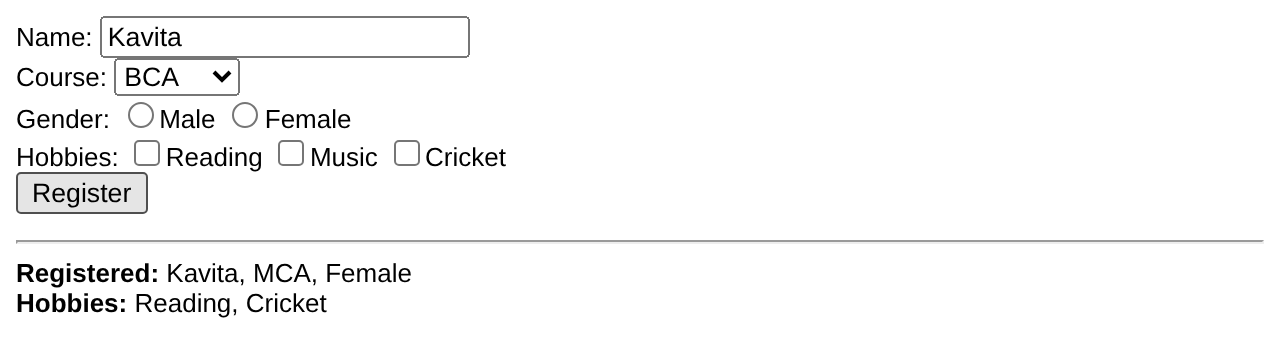
Name:
Course:
BCA
MCA
B.Tech

Gender: Male Female
Hobbies: Reading Music Cricket

Registered: Kavita, MCA, Female
Hobbies: Reading, Cricket
- A group of checkboxes uses a name ending in
[](hobby[]); PHP then receives all checked values as an array. - Only checked checkboxes and the selected radio button are sent. Use
?? ''orisset()to avoid warnings when nothing is selected.
Key Takeaways
- Form fields are available in PHP through
$_POST,$_GETor$_REQUEST, keyed by the field'sname. - GET puts data in the URL (visible, bookmarkable, limited); POST sends it in the request body.
$_REQUESTmerges GET, POST and COOKIE data.- Always escape output with
htmlspecialchars()to prevent XSS. - A self-processing form checks
$_SERVER["REQUEST_METHOD"]; checkbox groups usename="x[]".
Program File
Extract the ZIP into C:\xampp\htdocs. It creates the folder phpbook/ch11 used in the file labels above; open the programs at http://localhost/phpbook/… with Apache (and MySQL, where needed) started in the XAMPP Control Panel.
Question / Answer (15 questions)
MCQ Test : Check Your Understanding (5 questions)
Select an option and press Check Answer, or answer all questions and press Submit Test to see your score. Each answer comes with an explanation.
Bibliography/References
The notes on this page are the author’s own compilation from the e-book PHP: Basics to Advance. Every program was run on Apache with PHP 8 and MariaDB, and the output shown is the real result of that run. The works listed below were consulted and are cited for attribution and further reading. Product names and trademarks belong to their respective owners.
- The PHP Group. (n.d.). PHP Manual – Dealing with Forms. https://www.php.net/manual/en/tutorial.forms.php
- The PHP Group. (n.d.). PHP Manual – $_POST. https://www.php.net/manual/en/reserved.variables.post.php
- The PHP Group. (n.d.). PHP Manual – $_GET. https://www.php.net/manual/en/reserved.variables.get.php
- The PHP Group. (n.d.). PHP Manual – htmlspecialchars. https://www.php.net/manual/en/function.htmlspecialchars.php
- OWASP Foundation. (n.d.). Cross Site Scripting (XSS). https://owasp.org/www-community/attacks/xss/