
Learning Objectives – after this chapter you will be able to:
- Explain why arrays are needed and create them with
array()and[ ]. - Work with numeric, associative and multidimensional arrays.
- Display arrays with
print_r()andvar_dump(), and loop through them. - Use
extract(),count(), sorting functions and array destructuring.
Why Arrays?
An array stores multiple values in one single variable. A normal variable is a storage area that holds a number or text – but only one value. If you have a list of items (a list of car names, for example), storing the cars in single variables could look like this:
$cars1 = "Ford";
$cars2 = "Maruti";
$cars3 = "BMW";
But what if you want to loop through the cars and find a specific one? And what if you had not 3 cars but 3000? The best solution is an array. An array holds all the values under a single name, and each element has its own index (key) so that it can be accessed easily.
In PHP there are three kinds of arrays:
- Numeric (indexed) array – an array with a numeric index.
- Associative array – an array where each key is associated with a value.
- Multidimensional array – an array containing one or more arrays.
Numeric Arrays
A numeric array stores each element with a numeric index. There are two ways to create one.
- The index is assigned automatically (it starts at 0):
$cars = array("Saab", "Volvo", "BMW", "Toyota");
$cars = ["Saab", "Volvo", "BMW", "Toyota"]; // short syntax (PHP 5.4+)- The index is assigned manually:
$cars[0] = "Saab";
$cars[1] = "Volvo";
$cars[2] = "BMW";
$cars[3] = "Toyota";
In the following example you access the values by referring to the array name and index:
<?php
$cars[0] = "Saab";
$cars[1] = "Volvo";
$cars[2] = "BMW";
$cars[3] = "Toyota";
echo $cars[0] . " and " . $cars[1] . " are Swedish cars.<br>";
$cars[] = "Maruti";                 // [] appends at the next index
echo "Number of cars: " . count($cars) . "<br>";
for ($i = 0; $i < count($cars); $i++) {
    echo "$i: $cars[$i]<br>";
}
?>Saab and Volvo are Swedish cars. Number of cars: 5 0: Saab 1: Volvo 2: BMW 3: Toyota 4: Maruti
Associative Arrays
In an associative array each key is associated with a value. When storing data about specific named values, a numeric array is not always the best choice. With associative arrays we can use meaningful keys and assign values to them. In this example we use an array to assign ages to different persons:
$ages = array("Peter" => 32, "Quagmire" => 30, "Joe" => 34);This example creates the same array in a different way:
$ages['Peter'] = 32;
$ages['Quagmire'] = 30;
$ages['Joe'] = 34;
The keys can be used in a script:
<?php
$ages['Peter'] = 32;
$ages['Quagmire'] = 30;
$ages['Joe'] = 34;
echo "Peter is " . $ages['Peter'] . " years old.<br>";
foreach ($ages as $person => $age) {
    echo "$person => $age<br>";
}
?>Peter is 32 years old. Peter => 32 Quagmire => 30 Joe => 34
The extract() function
With extract(), every key of an associative array is converted into a variable with the same name, initialised with the element's value.
<?php
$ages = array("Peter" => 32, "Quagmire" => 30, "Joe" => 34);
$n = extract($ages);
echo "$n variables created.<br>";
echo "Peter is " . $Peter . " years old.<br>";
echo "Joe is $Joe years old.";
?>3 variables created. Peter is 32 years old. Joe is 34 years old.
Never call extract() on user input such as $_GET or $_POST: a visitor could then overwrite any variable of your script – the same danger as the old register_globals.
Multidimensional Arrays
In a multidimensional array, each element of the main array can itself be an array, and each element of the sub-array can be an array, and so on. In this example we create a multidimensional array with automatically assigned keys:
<?php
$families = array
(
    "Griffin" => array
    (
        "Peter",
        "Lois",
        "Megan"
    ),
    "Quagmire" => array
    (
        "Glenn"
    ),
    "Brown" => array
    (
        "Cleveland",
        "Loretta",
        "Junior"
    )
);
echo "<pre>";
print_r($families);
echo "</pre>";
echo "Is " . $families['Griffin'][2] . " a part of the Griffin family?";
?>Array
(
[Griffin] => Array
(
[0] => Peter
[1] => Lois
[2] => Megan
)
[Quagmire] => Array
(
[0] => Glenn
)
[Brown] => Array
(
[0] => Cleveland
[1] => Loretta
[2] => Junior
)
)
Is Megan a part of the Griffin family?print_r() prints an array in a human-readable form; wrapping it in <pre> keeps the indentation in the browser.
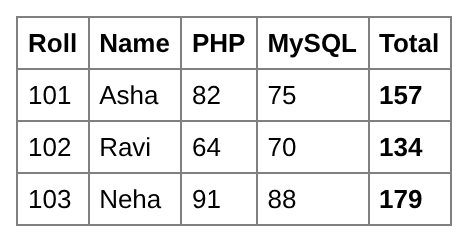
A two-dimensional table of marks
<?php
$students = [
    ["roll" => 101, "name" => "Asha",  "php" => 82, "mysql" => 75],
    ["roll" => 102, "name" => "Ravi",  "php" => 64, "mysql" => 70],
    ["roll" => 103, "name" => "Neha",  "php" => 91, "mysql" => 88],
];
echo "<table border='1' cellpadding='5' style='border-collapse:collapse;font-family:Arial;font-size:13px'>";
echo "<tr><th>Roll</th><th>Name</th><th>PHP</th><th>MySQL</th><th>Total</th></tr>";
foreach ($students as $s) {
    $total = $s['php'] + $s['mysql'];
    echo "<tr><td>{$s['roll']}</td><td>{$s['name']}</td><td>{$s['php']}</td>"
       . "<td>{$s['mysql']}</td><td><b>$total</b></td></tr>";
}
echo "</table>";
?>
Sorting Arrays
| Function | Sorts |
|---|---|
| sort() | values in ascending order, re-indexing the keys |
| rsort() | values in descending order |
| asort() | an associative array by value, keeping keys |
| arsort() | by value in descending order, keeping keys |
| ksort() | by key, ascending |
| krsort() | by key, descending |
| usort() | with a user-defined comparison function |
<?php
$nums = [40, 10, 30, 20];
sort($nums);
echo "sort: " . implode(", ", $nums) . "<br>";
rsort($nums);
echo "rsort: " . implode(", ", $nums) . "<br>";
$ages = ["Peter" => 32, "Asha" => 21, "Joe" => 34];
asort($ages);
echo "asort: "; print_r($ages); echo "<br>";
ksort($ages);
echo "ksort: "; print_r($ages); echo "<br>";
usort($nums, fn($a, $b) => $a <=> $b);
echo "usort ascending: " . implode(", ", $nums);
?>sort: 10, 20, 30, 40 rsort: 40, 30, 20, 10 asort: Array ( [Asha] => 21 [Peter] => 32 [Joe] => 34 ) ksort: Array ( [Asha] => 21 [Joe] => 34 [Peter] => 32 ) usort ascending: 10, 20, 30, 40
Useful Array Tools
<?php
$colors = ["red", "green", "blue"];
echo "in_array('green'): " . (in_array("green", $colors) ? "yes" : "no") . "<br>";
echo "array_search('blue'): " . array_search("blue", $colors) . "<br>";
array_push($colors, "black");          // add at the end
array_unshift($colors, "white");       // add at the beginning
echo "after push/unshift: " . implode(", ", $colors) . "<br>";
$last = array_pop($colors);
echo "array_pop removed: $last<br>";
echo "array_reverse: " . implode(", ", array_reverse($colors)) . "<br>";
[$first, $second] = $colors;           // array destructuring
echo "first = $first, second = $second<br>";
echo "range(1, 5): " . implode(" ", range(1, 5)) . "<br>";
echo "array_sum: " . array_sum([10, 20, 30]);
?>in_array('green'): yes
array_search('blue'): 2
after push/unshift: white, red, green, blue, black
array_pop removed: black
array_reverse: blue, green, red, white
first = white, second = red
range(1, 5): 1 2 3 4 5
array_sum: 60Part II (Chapter 23) lists all array functions.
Key Takeaways
- An array stores many values under one name; elements are reached by index or key.
- Numeric arrays start at index 0;
$a[] = xappends. - Associative arrays use named keys:
["Peter" => 32]. - Multidimensional arrays contain arrays:
$families['Griffin'][2]. print_r()/var_dump()display arrays;foreachloops through them.extract()turns keys into variables – never use it on user input.sort,rsort,asort,ksortandusortsort arrays.
Program File
Extract the ZIP into C:\xampp\htdocs. It creates the folder phpbook/ch09 used in the file labels above; open the programs at http://localhost/phpbook/… with Apache (and MySQL, where needed) started in the XAMPP Control Panel.
Question / Answer (15 questions)
MCQ Test : Check Your Understanding (5 questions)
Select an option and press Check Answer, or answer all questions and press Submit Test to see your score. Each answer comes with an explanation.
Bibliography/References
The notes on this page are the author’s own compilation from the e-book PHP: Basics to Advance. Every program was run on Apache with PHP 8 and MariaDB, and the output shown is the real result of that run. The works listed below were consulted and are cited for attribution and further reading. Product names and trademarks belong to their respective owners.
- The PHP Group. (n.d.). PHP Manual – Arrays. https://www.php.net/manual/en/language.types.array.php
- The PHP Group. (n.d.). PHP Manual – Array Functions. https://www.php.net/manual/en/ref.array.php
- The PHP Group. (n.d.). PHP Manual – extract. https://www.php.net/manual/en/function.extract.php
- The PHP Group. (n.d.). PHP Manual – Sorting Arrays. https://www.php.net/manual/en/array.sorting.php