
Learning Objectives – after this chapter you will be able to:
- Explain what ODBC is and when it is useful in PHP.
- Create an ODBC data source name (DSN) on Windows for MS Access, Oracle or MySQL/MariaDB.
- Enable the ODBC extension in XAMPP.
- Connect, run queries and read results with
odbc_connect(),odbc_exec(),odbc_fetch_row(),odbc_result()andodbc_close(). - Use prepared ODBC statements and display data in an HTML table.
What is ODBC?
ODBC (Open Database Connectivity) is a standard programming interface for accessing database management systems. An application talks to the ODBC Driver Manager, which loads the driver for the particular database. With an ODBC connection you can connect to any database, on any computer in your network, as long as an ODBC driver and connection are available – Microsoft Access, Microsoft SQL Server, Oracle, MySQL/MariaDB, PostgreSQL, Excel files and many more.
odbc extension passes the calls to the operating system.Figure 37.1 – How PHP reaches a database through ODBC
A DSN (Data Source Name) is a named configuration that stores which driver to use and where the database is. The PHP program only needs the DSN name.
For MySQL/MariaDB always use MySQLi (Chapters 34–36) – it is faster and supports all features. ODBC is useful when PHP must read data from a database that has no native PHP extension, for example an existing MS Access file or a legacy system.
Enabling ODBC in XAMPP
The ODBC extension is part of PHP for Windows. If function_exists('odbc_connect') returns false, open Config → PHP (php.ini) in the XAMPP Control Panel, make sure the following line is not commented out (no ; at the beginning) and restart Apache:
extension=odbc
Creating an ODBC Connection on Windows
To an MS Access database
- Open Control Panel → Administrative Tools (Windows 10/11: Windows Tools), or search the Start menu for "ODBC Data Sources (64-bit)".
- Choose the System DSN tab (a system DSN is visible to all users and to the Apache service).
- Click Add.
- Select Microsoft Access Driver (\.mdb, \.accdb) and click Finish.
- In the next screen click Select to locate the database file.
- Give the database a Data Source Name (DSN), e.g.
northwind. - Click OK.
The bitness must match: 64-bit XAMPP/PHP needs a 64-bit ODBC driver and the 64-bit ODBC administrator. If the 64-bit Access driver is missing, install the free Microsoft Access Database Engine Redistributable (64-bit).
To an Oracle database
- Open the ODBC Data Sources administrator.
- Choose the System DSN tab and click Add.
- Select the Oracle ODBC driver (in older Windows versions Microsoft ODBC for Oracle) and click Finish.
- Give the database a Data Source Name (DSN), e.g.
oraphp, and the Oracle service name. - Click OK.
To a MySQL or MariaDB database
Install MySQL Connector/ODBC or MariaDB Connector/ODBC, then add a System DSN with the driver MariaDB ODBC … Driver (or MySQL ODBC … Driver), server localhost, user root and the database name.
The DSN used for the outputs in this chapter
The programs in this chapter were run against a DSN named northwind that points (through MariaDB Connector/ODBC and unixODBC on Linux) to a MariaDB copy of the classic Northwind customers table:
[northwind]
Description=Northwind sample database (MariaDB)
Driver=MariaDB Unicode
Server=localhost
Database=northwind
MariaDB [northwind]> SELECT CustomerID, CompanyName, ContactName, City FROM customers;
+------------+--------------------------+------------------+-------------+
| CustomerID | CompanyName              | ContactName      | City        |
+------------+--------------------------+------------------+-------------+
| ALFKI      | Alfreds Futterkiste      | Maria Anders     | Berlin      |
| ANATR      | Ana Trujillo Emparedados | Ana Trujillo     | Mexico D.F. |
| BHOPL      | Bhopal Book House        | Ramesh Gupta     | Bhopal      |
| BONAP      | Bon app                  | Laurence Lebihan | Marseille   |
| INDOR      | Indore Traders           | Sushma Jain      | Indore      |
+------------+--------------------------+------------------+-------------+
5 rows in set
Connecting to an ODBC Data Source
odbc_connect() connects to an ODBC data source. It takes four parameters: the data source name, user name, password and an optional cursor type. It returns a connection resource (or false). odbc_exec() executes an SQL statement and returns a result identifier.
The classic example connects to an MS Access DSN called northwind with no user name and no password (Access files need none), then creates and executes an SQL statement:
$conn = odbc_connect('northwind', '', '');
$sql  = "SELECT * FROM customers";
$rs   = odbc_exec($conn, $sql);
For an Oracle DSN called oraphp with the user "system" and password "Manager":
$conn = odbc_connect('oraphp', 'system', 'Manager');
$sql  = "SELECT * FROM customers";
$rs   = odbc_exec($conn, $sql);
Our northwind DSN points to MariaDB, which needs a database user, so the programs pass root and the empty XAMPP password:
<?php
$conn = odbc_connect('northwind', 'root', '');
if (!$conn) {
    exit("Connection Failed: " . odbc_errormsg());
}
echo "Connected to the ODBC data source 'northwind'.<br>";
$rs = odbc_exec($conn, "SELECT COUNT(*) AS total FROM customers");
odbc_fetch_row($rs);
echo "Number of customers: " . odbc_result($rs, "total");
odbc_close($conn);
?>Connected to the ODBC data source 'northwind'. Number of customers: 5
Retrieving Records
odbc_fetch_row() moves to the next record of the result set. It returns true if it was able to return a row, otherwise false. It takes two parameters: the ODBC result identifier and an optional row number.
odbc_fetch_row($rs)
Retrieving fields from a record
odbc_result() reads a field from the current record. It takes two parameters: the ODBC result identifier and a field number or name. The line below returns the value of the first field:
$compname = odbc_result($rs, 1);
and this line returns the value of the field called CompanyName:
$compname = odbc_result($rs, "CompanyName");
Closing an ODBC connection
odbc_close() closes an ODBC connection:
odbc_close($conn);
An ODBC Example
The following example first creates a database connection, then a result set, and then displays the data in an HTML table:
<html>
<body style="font-family:Arial;font-size:13px">
<?php
$conn = odbc_connect('northwind', 'root', '');
if (!$conn) {
    exit("Connection Failed: " . $conn);
}
$sql = "SELECT * FROM customers";
$rs = odbc_exec($conn, $sql);
if (!$rs) {
    exit("Error in SQL");
}
echo "<table border='1' cellpadding='4' style='border-collapse:collapse'><tr>";
echo "<th>Companyname</th>";
echo "<th>Contactname</th></tr>";
while (odbc_fetch_row($rs)) {
    $compname = odbc_result($rs, "CompanyName");
    $conname = odbc_result($rs, "ContactName");
    echo "<tr><td>$compname</td>";
    echo "<td>$conname</td></tr>";
}
odbc_close($conn);
echo "</table>";
?>
</body>
</html>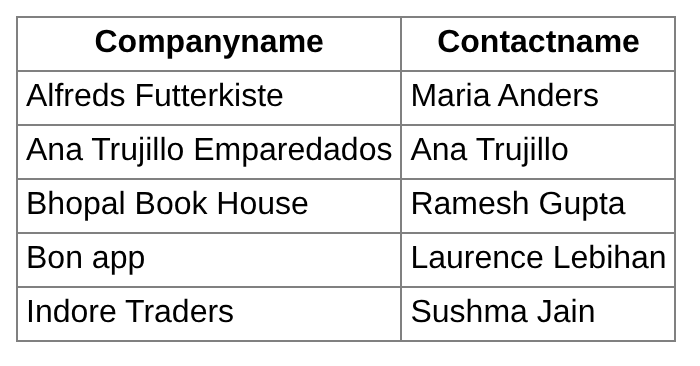
More ODBC Functions
| Function | Purpose |
|---|---|
| odbc_connect(dsn, user, password [, cursor]) | Connects to a data source. |
| odbc_pconnect(...) | Opens a persistent connection. |
| odbc_exec(conn, sql) | Prepares and executes an SQL statement. odbc_do() is an alias. |
| odbc_prepare(conn, sql) / odbc_execute(result, params) | Prepares a statement with ? placeholders / executes it with an array of values. |
| odbc_fetch_row(result [, row]) | Fetches the next (or given) row. |
| odbc_fetch_array(result) / odbc_fetch_object(result) | Fetches a row as an associative array / object. |
| odbc_result(result, field) | Gets the value of a field of the current row (by number or name). |
| odbc_result_all(result) | Printed a result as an HTML table – deprecated in PHP 8.1. |
| odbc_num_rows(result) / odbc_num_fields(result) | Number of rows (for UPDATE/INSERT/DELETE; many drivers return -1 for SELECT) / columns. |
| odbc_field_name(result, n) / odbc_field_type(result, n) | Name / type of a column. |
| odbc_tables(conn) / odbc_columns(conn, …) | Lists tables / columns of the data source. |
| odbc_autocommit / odbc_commit / odbc_rollback (conn) | Transaction control. |
| odbc_error(conn) / odbc_errormsg(conn) | Last SQLSTATE error code / message. |
| odbc_close(conn) / odbc_close_all() | Closes a connection / all connections. |
Prepared statements and fetch_array
<?php
$conn = odbc_connect('northwind', 'root', '');
$stmt = odbc_prepare($conn, "SELECT CustomerID, CompanyName, City FROM customers WHERE Country = ?");
odbc_execute($stmt, [$_GET['country'] ?? 'India']);
echo "Columns: " . odbc_num_fields($stmt) . " (";
for ($i = 1; $i <= odbc_num_fields($stmt); $i++) {
    echo odbc_field_name($stmt, $i) . ($i < odbc_num_fields($stmt) ? ", " : "");
}
echo ")<br>";
while ($row = odbc_fetch_array($stmt)) {
    echo htmlspecialchars("{$row['CustomerID']}: {$row['CompanyName']} – {$row['City']}") . "<br>";
}
odbc_close($conn);
?>Columns: 3 (CustomerID, CompanyName, City) BHOPL: Bhopal Book House – Bhopal INDOR: Indore Traders – Indore
Handling ODBC errors
<?php
$conn = odbc_connect('northwind', 'root', '');
$rs = @odbc_exec($conn, "SELECT * FROM suppliers");      // table does not exist
if (!$rs) {
    echo "SQLSTATE: " . odbc_error($conn) . "<br>";
    echo "Message: " . odbc_errormsg($conn);
}
odbc_close($conn);
?>SQLSTATE: S0002 Message: [ma-3.1.15][10.11.14-MariaDB-0ubuntu0.24.04.1]Table 'northwind.suppliers' doesn't exist
Key Takeaways
- ODBC is a standard interface that lets PHP reach any database for which an ODBC driver exists.
- A DSN (Data Source Name) stores the driver and the location of the database; create a System DSN in the ODBC Data Source Administrator.
- Enable
extension=odbcin php.ini; match 32/64-bit drivers with PHP. odbc_connect(dsn, user, password)→odbc_exec(conn, sql)→odbc_fetch_row()+odbc_result()→odbc_close().odbc_prepare()/odbc_execute()give prepared statements;odbc_errormsg()reports errors.- For MySQL/MariaDB itself prefer MySQLi.
Program File
Extract the ZIP into C:\xampp\htdocs. It creates the folder phpbook/ch37 used in the file labels above; open the programs at http://localhost/phpbook/… with Apache (and MySQL, where needed) started in the XAMPP Control Panel.
Question / Answer (15 questions)
MCQ Test : Check Your Understanding (5 questions)
Select an option and press Check Answer, or answer all questions and press Submit Test to see your score. Each answer comes with an explanation.
Bibliography/References
The notes on this page are the author’s own compilation from the e-book PHP: Basics to Advance. Every program was run on Apache with PHP 8 and MariaDB, and the output shown is the real result of that run. The works listed below were consulted and are cited for attribution and further reading. Product names and trademarks belong to their respective owners.
- The PHP Group. (n.d.). PHP Manual – ODBC Functions (Unified). https://www.php.net/manual/en/ref.uodbc.php
- The PHP Group. (n.d.). PHP Manual – odbc_connect. https://www.php.net/manual/en/function.odbc-connect.php
- Microsoft. (n.d.). ODBC Data Source Administrator. Microsoft Learn. https://learn.microsoft.com/en-us/sql/odbc/admin/odbc-data-source-administrator
- MariaDB plc. (n.d.). MariaDB Connector/ODBC. https://mariadb.com/kb/en/mariadb-connector-odbc/
- unixODBC Project. (n.d.). unixODBC. https://www.unixodbc.org/