
Learning Objectives – after this chapter you will be able to:
- Create a connection object with
new mysqli()and handle errors with exceptions. - Use the methods and properties of the
mysqliandmysqli_resultclasses. - Rewrite every program of Chapter 34 in object-oriented style.
- Iterate result sets with
foreachand fetch rows into your own classes. - Build a reusable
Databaseclass and a complete object-oriented CRUD page.
MySQLi – Object-Oriented Interface
The object-oriented interface of MySQLi uses three main classes:
| Class | Represents |
|---|---|
| mysqli | A connection to the database server – created with new mysqli(...). |
| mysqli_result | The result set of a query – returned by $conn->query() for SELECT. |
| mysqli_stmt | A prepared statement – returned by $conn->prepare() (Chapter 36). |
Instead of calling a function and passing the connection, you call a method on the connection object with the arrow operator ->. Information such as the number of affected rows is available as a property.
| Task | Procedural | Object-oriented |
|---|---|---|
| Connect | mysqli_connect(h, u, p, db) | new mysqli(h, u, p, db) |
| Connection error | mysqli_connect_error() | $conn->connect_error |
| Run a query | mysqli_query($conn, $sql) | $conn->query($sql) |
| Fetch a row | mysqli_fetch_assoc($result) | $result->fetch_assoc() |
| Number of rows | mysqli_num_rows($result) | $result->num_rows |
| Rows changed | mysqli_affected_rows($conn) | $conn->affected_rows |
| Last id | mysqli_insert_id($conn) | $conn->insert_id |
| Escape a string | mysqli_real_escape_string($conn, $s) | $conn->real_escape_string($s) |
| Error | mysqli_error($conn) | $conn->error |
| Close | mysqli_close($conn) | $conn->close() |
The programs below are numbered like those in Chapters 33 and 34: Program 35.3 does exactly what Listing L33.3 and Program 34.3 do.
Program 35.1 – Connecting to the Server
<?php
$conn = new mysqli("localhost", "root", "");
echo "Connected successfully<br>";
echo "Host info: " . $conn->host_info . "<br>";
echo "Server version: " . $conn->server_info . "<br>";
echo "Protocol version: " . $conn->protocol_version;
$conn->close();
?>Connected successfully Host info: Localhost via UNIX socket Server version: 10.11.14-MariaDB-0ubuntu0.24.04.1 Protocol version: 10
Handling connection errors
As in the procedural style, PHP 8.1+ throws a mysqli_sql_exception when the connection fails:
<?php
try {
    $conn = new mysqli("localhost", "root", "wrongpass", "phpbook");
    echo "Connected";
} catch (mysqli_sql_exception $e) {
    echo "Connection failed (" . $e->getCode() . "): " . $e->getMessage();
}
?>Connection failed (1045): Access denied for user 'root'@'localhost' (using password: YES)
<?php
$conn = new mysqli("localhost", "root", "", "phpbook");
$conn->set_charset("utf8mb4");
Program 35.2 – Selecting the Database
<?php
$conn = new mysqli("localhost", "root", "");
$conn->select_db("phpbook");
$row = $conn->query("SELECT DATABASE() AS db")->fetch_assoc();
echo "Database " . $row['db'] . " selected";
$conn->close();
?>Database phpbook selected
Note the method chaining: $conn->query(...) returns a mysqli_result object, on which ->fetch_assoc() is called directly.
Program 35.3 – Creating a Table
<?php
require_once "db.php";
$conn->query("DROP TABLE IF EXISTS enquiry");
$sql = "CREATE TABLE IF NOT EXISTS enquiry (
          id INT AUTO_INCREMENT PRIMARY KEY,
          name VARCHAR(50) NOT NULL,
          mobile VARCHAR(10),
          course VARCHAR(30),
          enquired_on DATETIME DEFAULT CURRENT_TIMESTAMP)";
if ($conn->query($sql) === true) {
    echo "Table enquiry created";
}
$conn->close();
?>Table enquiry created
Program 35.4 – Inserting Records from a Form
The form enquiry.html is the same as in Chapter 34.
<?php
require_once "db.php";
$name   = $conn->real_escape_string($_POST['name']);
$mobile = $conn->real_escape_string($_POST['mobile']);
$course = $conn->real_escape_string($_POST['course']);
$sql = "INSERT INTO enquiry (name, mobile, course)
        VALUES ('$name', '$mobile', '$course')";
if ($conn->query($sql)) {
    echo "Record saved. Enquiry number: " . $conn->insert_id;
}
$conn->close();
?>Record saved. Enquiry number: 1
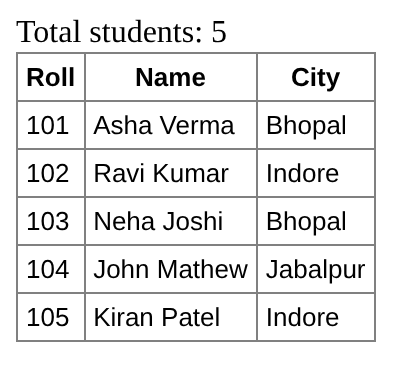
Program 35.5 – Retrieving Data
<?php
require_once "db.php";
$result = $conn->query("SELECT roll, name, city FROM students ORDER BY roll");
echo "Total students: " . $result->num_rows . "<br>";
echo "<table border='1' cellpadding='4' style='border-collapse:collapse;font-family:Arial;font-size:13px'>";
echo "<tr><th>Roll</th><th>Name</th><th>City</th></tr>";
while ($row = $result->fetch_array()) {
    echo "<tr><td>" . $row['roll'] . "</td><td>" . $row['name']
       . "</td><td>" . $row[2] . "</td></tr>";
}
echo "</table>";
$result->free();
$conn->close();
?>
Iterating a result with foreach
A mysqli_result object can be used directly in a foreach loop – each element is an associative array:
<?php
require_once "db.php";
$result = $conn->query("SELECT roll, name FROM students WHERE city = 'Indore'");
foreach ($result as $row) {
    echo $row['roll'] . " – " . $row['name'] . "<br>";
}
echo "Columns in the result: " . $result->field_count;
$conn->close();
?>102 – Ravi Kumar 105 – Kiran Patel Columns in the result: 2
Program 35.6 – Updating Records
<?php
require_once "db.php";
$conn->query("UPDATE students SET city = 'Sehore' WHERE roll = 103");
echo $conn->affected_rows . " record(s) updated<br>";
$row = $conn->query("SELECT name, city FROM students WHERE roll = 103")->fetch_object();
echo "Now: $row->name lives in $row->city";
$conn->close();
?>1 record(s) updated Now: Neha Joshi lives in Sehore
Program 35.7 – Deleting Records
<?php
require_once "db.php";
$roll = (int) $_GET['roll'];
$conn->query("DELETE FROM enquiry WHERE id = $roll");
echo $conn->affected_rows . " record(s) deleted<br>";
$result = $conn->query("SELECT id, name FROM enquiry");
while ($row = $result->fetch_row()) {
    echo "Remaining: #$row[0] $row[1]<br>";
}
$conn->close();
?>1 record(s) deleted Remaining: #1 Sunita Rao Remaining: #3 Meena Sahu
Program 35.8 – Searching with a Form
<?php
require_once "db.php";
$city = $conn->real_escape_string($_GET['city'] ?? '');
?>
<form style="font-family:Arial;font-size:13px">
  City: <input name="city" value="<?= htmlspecialchars($city) ?>"> <input type="submit" value="Search">
</form>
<div style="font-family:Arial;font-size:13px">
<?php
$result = $conn->query("SELECT name, city FROM students WHERE city LIKE '%$city%'");
if ($result->num_rows == 0) {
    echo "No student found";
}
while ($row = $result->fetch_assoc()) {
    echo htmlspecialchars($row['name']) . " – " . htmlspecialchars($row['city']) . "<br>";
}
$conn->close();
?>
</div>
Fetching Rows into Objects of Your Own Class
fetch_object() can create an object of your own class, so the row immediately has your methods:
<?php
require_once "db.php";
class Course
{
    public $course_id, $course_name, $duration, $fee;
    public function feeWithGst(): string
    {
        return number_format($this->fee * 1.18, 2);
    }
}
$result = $conn->query("SELECT * FROM courses ORDER BY fee");
while ($c = $result->fetch_object("Course")) {
    echo "$c->course_name ($c->duration): Rs. $c->fee + GST = Rs. " . $c->feeWithGst() . "<br>";
}
echo "<br>fetch_all(): ";
$all = $conn->query("SELECT course_name FROM courses")->fetch_all(MYSQLI_ASSOC);
echo implode(", ", array_column($all, "course_name"));
$conn->close();
?>MySQL (1 month): Rs. 2500.00 + GST = Rs. 2,950.00 Core PHP (3 months): Rs. 4500.00 + GST = Rs. 5,310.00 Advance PHP (2 months): Rs. 6000.00 + GST = Rs. 7,080.00 Laravel (2 months): Rs. 8000.00 + GST = Rs. 9,440.00 fetch_all(): Advance PHP, Core PHP, Laravel, MySQL
Handling Query Errors
<?php
require_once "db.php";
try {
    $conn->query("INSERT INTO students (roll, name) VALUES (101, 'Duplicate')");
} catch (mysqli_sql_exception $e) {
    echo "Exception " . $e->getCode() . ": " . $e->getMessage() . "<br>";
}
mysqli_report(MYSQLI_REPORT_OFF);              // switch exceptions off
if (!$conn->query("SELECT * FROM coursez")) {
    echo "\$conn->errno: " . $conn->errno . "<br>";
    echo "\$conn->error: " . $conn->error;
}
$conn->close();
?>Exception 1062: Duplicate entry '101' for key 'roll' $conn->errno: 1146 $conn->error: Table 'phpbook.coursez' doesn't exist
Error 1062 is MySQL's code for a duplicate entry – roll is a UNIQUE column and roll 101 already exists.
multi_query() in OOP Style
<?php
require_once "db.php";
$sql = "SELECT COUNT(*) FROM students; SELECT COUNT(*) FROM courses; SELECT MAX(fee) FROM courses";
$labels = ["Students", "Courses", "Highest fee"];
$i = 0;
if ($conn->multi_query($sql)) {
    do {
        if ($result = $conn->store_result()) {
            echo $labels[$i++] . ": " . $result->fetch_row()[0] . "<br>";
            $result->free();
        }
    } while ($conn->next_result());
}
$conn->close();
?>Students: 5 Courses: 4 Highest fee: 8000.00
A Reusable Database Class
In object-oriented applications the connection is usually wrapped in a small class. Combined with the Singleton pattern (Chapter 18), the whole application shares one connection:
<?php
class Database
{
    private static ?Database $instance = null;
    private mysqli $conn;

    private function __construct()
    {
        $this->conn = new mysqli("localhost", "root", "", "phpbook");
        $this->conn->set_charset("utf8mb4");
    }
    public static function get(): Database
    {
        return self::$instance ??= new Database();
    }
    public function select(string $sql): array
    {
        return $this->conn->query($sql)->fetch_all(MYSQLI_ASSOC);
    }
    public function execute(string $sql): int
    {
        $this->conn->query($sql);
        return $this->conn->affected_rows;
    }
    public function lastId(): int
    {
        return $this->conn->insert_id;
    }
    public function escape(string $s): string
    {
        return $this->conn->real_escape_string($s);
    }
}<?php
require_once "Database.php";
$db = Database::get();
$rows = $db->select("SELECT name, city FROM students ORDER BY name LIMIT 3");
foreach ($rows as $r) {
echo "{$r['name']} ({$r['city']})<br>";
}
$n = $db->execute("UPDATE courses SET fee = fee + 500 WHERE course_name = 'MySQL'");
echo "Fee updated in $n row(s)<br>";
echo "Same object every time? " . var_export(Database::get() === $db, true);
?>Asha Verma (Bhopal) John Mathew (Jabalpur) Kiran Patel (Indore) Fee updated in 1 row(s) Same object every time? true
A Complete CRUD Page – Object-Oriented Style
The same CRUD page as in Chapter 34, this time for the students table and written with objects:
<?php
require_once "db.php";

class StudentRepository
{
    public function __construct(private mysqli $conn) {}

    public function all(): mysqli_result
    {
        return $this->conn->query("SELECT id, roll, name, city FROM students ORDER BY roll");
    }
    public function find(int $id): ?array
    {
        return $this->conn->query("SELECT * FROM students WHERE id = $id")->fetch_assoc();
    }
    public function save(int $id, int $roll, string $name, string $city): string
    {
        $name = $this->conn->real_escape_string($name);
        $city = $this->conn->real_escape_string($city);
        if ($id > 0) {
            $this->conn->query("UPDATE students SET roll=$roll, name='$name', city='$city' WHERE id=$id");
            return "Student updated.";
        }
        $this->conn->query("INSERT INTO students (roll, name, city) VALUES ($roll, '$name', '$city')");
        return "Student added with id " . $this->conn->insert_id . ".";
    }
    public function delete(int $id): string
    {
        $this->conn->query("DELETE FROM students WHERE id = $id");
        return $this->conn->affected_rows . " student deleted.";
    }
}

$repo = new StudentRepository($conn);
$msg = "";
$edit = ["id" => 0, "roll" => "", "name" => "", "city" => ""];
try {
    if ($_SERVER["REQUEST_METHOD"] == "POST") {
        $msg = $repo->save((int) $_POST["id"], (int) $_POST["roll"], trim($_POST["name"]), trim($_POST["city"]));
    }
    if (isset($_GET["delete"])) $msg = $repo->delete((int) $_GET["delete"]);
    if (isset($_GET["edit"]))   $edit = $repo->find((int) $_GET["edit"]) ?? $edit;
} catch (mysqli_sql_exception $e) {
    $msg = "Error: " . $e->getMessage();
}
?>
<html><body style="font-family:Arial;font-size:13px">
<h3>Students</h3>
<p style="color:green"><?= htmlspecialchars($msg) ?></p>
<form method="post" action="students.php">
  <input type="hidden" name="id" value="<?= $edit['id'] ?>">
  Roll <input id="roll" name="roll" size="4" value="<?= $edit['roll'] ?>">
  Name <input id="name" name="name" size="12" value="<?= htmlspecialchars($edit['name']) ?>">
  City <input id="city" name="city" size="8" value="<?= htmlspecialchars($edit['city'] ?? '') ?>">
  <input type="submit" id="save" value="<?= $edit['id'] ? 'Update' : 'Add' ?>">
</form><br>
<table border="1" cellpadding="4" style="border-collapse:collapse">
<tr><th>Roll</th><th>Name</th><th>City</th><th>Action</th></tr>
<?php foreach ($repo->all() as $s): ?>
<tr><td><?= $s['roll'] ?></td><td><?= htmlspecialchars($s['name']) ?></td>
    <td><?= htmlspecialchars($s['city'] ?? '') ?></td>
    <td><a href="students.php?edit=<?= $s['id'] ?>">Edit</a> |
        <a href="students.php?delete=<?= $s['id'] ?>">Delete</a></td></tr>
<?php endforeach; ?>
</table>
</body></html>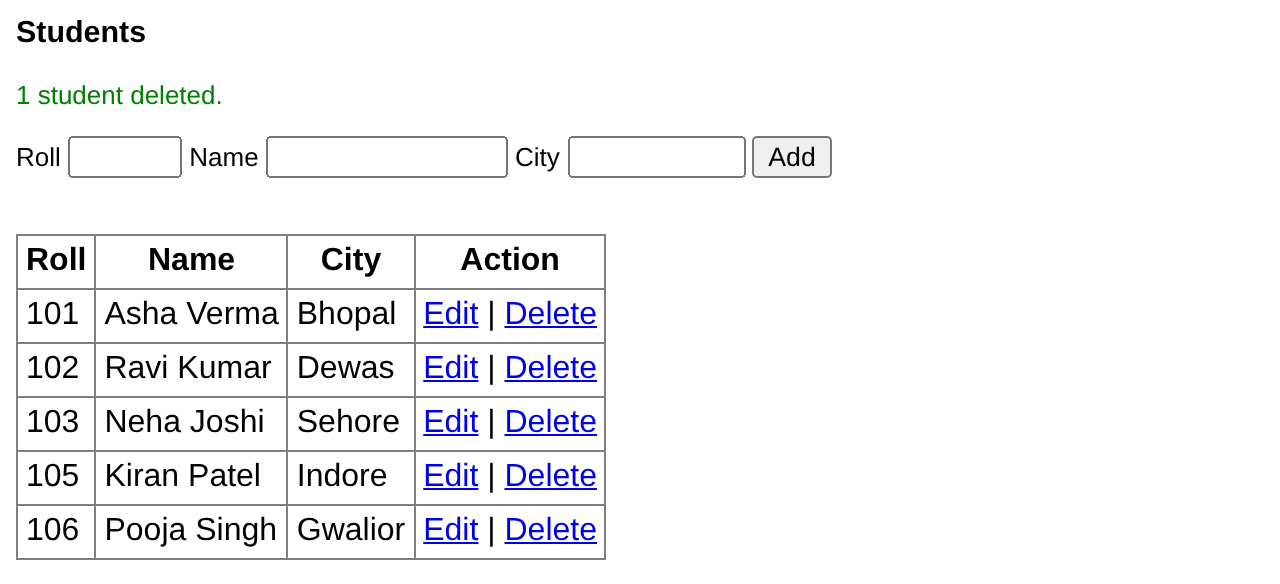
Key Takeaways
- The OOP interface uses the classes
mysqli(connection),mysqli_result(result) andmysqli_stmt(prepared statement). - Connect with
new mysqli(host, user, pass, db); errors throwmysqli_sql_exceptionin PHP 8.1+. - Methods replace functions (
$conn->query(),$result->fetch_assoc()), properties replace info functions ($conn->insert_id,$conn->affected_rows,$result->num_rows). - Results can be iterated with
foreachand fetched into your own classes withfetch_object("Class"). - A
Databaseclass or repository class keeps database code in one place.
Program File
Extract the ZIP into C:\xampp\htdocs. It creates the folder phpbook/ch35 used in the file labels above; open the programs at http://localhost/phpbook/… with Apache (and MySQL, where needed) started in the XAMPP Control Panel.
Question / Answer (15 questions)
MCQ Test : Check Your Understanding (5 questions)
Select an option and press Check Answer, or answer all questions and press Submit Test to see your score. Each answer comes with an explanation.
Bibliography/References
The notes on this page are the author’s own compilation from the e-book PHP: Basics to Advance. Every program was run on Apache with PHP 8 and MariaDB, and the output shown is the real result of that run. The works listed below were consulted and are cited for attribution and further reading. Product names and trademarks belong to their respective owners.
- The PHP Group. (n.d.). PHP Manual – The mysqli class. https://www.php.net/manual/en/class.mysqli.php
- The PHP Group. (n.d.). PHP Manual – mysqli_result class. https://www.php.net/manual/en/class.mysqli-result.php
- The PHP Group. (n.d.). PHP Manual – mysqli_result::fetch_object. https://www.php.net/manual/en/mysqli-result.fetch-object.php
- The PHP Group. (n.d.). PHP Manual – Dual procedural and object-oriented interface. https://www.php.net/manual/en/mysqli.quickstart.dual-interface.php
- MariaDB Foundation. (n.d.). MariaDB Error Codes. https://mariadb.com/kb/en/mariadb-error-codes/