
Learning Objectives – after this chapter you will be able to:
- Explain the Model–View–Controller architectural pattern and its benefits.
- Describe the role of the model, the view, the controller and the infrastructure.
- Recognise the "single script" anti-pattern and why it causes problems.
- Organise a small PHP application into model, view and controller files.
What is MVC?
Model–View–Controller (MVC) is a software architecture, considered an architectural pattern in software engineering. The pattern isolates the domain logic (the application logic for the user) from the user interface (input and presentation), permitting independent development, testing and maintenance of each part – the principle of separation of concerns.
When PHP first arrived on the scene, a minor revolution took place. Interactive web applications, once the preserve of professional developers, sprang up everywhere. The reason was the enormous accessibility of PHP: not only was the "hello world" program refreshingly easy, even traditionally complex procedures such as database integration became possible with a few lines of code.
The problem is that this accessibility was quickly abused. Complex applications were built by inexperienced staff, and experienced professionals were tempted to cut corners because PHP made it so easy. The result: unmaintainable applications, instability, unreliability and even exploitable security holes. Languages such as Java and C++ enforce good practices through their design; PHP requires self-discipline. One of the most important examples of such best-practice methodology is the MVC pattern.
Introducing MVC
The M is for model, the V for view, and the C for controller. MVC is a design pattern – a description of a reusable solution to a recurring problem in a particular context. Design patterns exist so that the challenges of large applications are approached in a consistent, tried-and-tested manner.
Here the problem is how best to separate the user control of a program (the controller), its output (the view) and its inner processing and decision-making (the model) into three distinct, separable components. Why?
- Separation yields interchangeability. Because the three components are separate but talk to each other consistently, any one of them can be swapped. To make a web application work on mobile phones instead of desktop browsers, swap the view for one that renders content for small screens. To accept voice input instead of mouse clicks, swap the controller.
- Debugging and maintenance become simpler. It is much better to have many small components that talk to each other than a handful of huge, unwieldy files filled with code.
- Several views and controllers can share one model. The same model can serve web browsers, mobile apps, a REST API and command-line tools – without duplicating the code behind the model.
Figure 19.1 – The MVC concept
The Model
The model is the heart of your application. It refers to the suite of classes you develop to handle the processes involved in your application's behaviour. It retrieves the data behind the output and manipulates data as a result of user input. The controller supplies the model with instructions; the view presents the data the model returns.
The View
The view is at the user end of the application. It presents data from the model that the user has requested, or information the model considers the user needs. The model supplies data to the view, which displays it in a manner appropriate to the display device. The view also renders the controls (links, forms) through which the user makes further input.
The Controller
The controller represents the user's interface to the model. It offers the input facilities that let users get data and requests into the application. It connects directly to the model, to which it supplies the data or request; the model then fulfils the request or stores the data.
The Infrastructure
There is actually a fourth component – the infrastructure. Its job is to glue the model, view and controller together. How this is done varies from language to language; in PHP it is usually a front script that includes the right files.
MVC in Web Applications
MVC is not a new concept; it can be seen as an evolution of IPO (Input, Processing, Output), the best-practice model of the old text-only applications. Applied to the web:
- The model is your suite of classes – they communicate with external data sources, make critical application decisions and parse and process input and output.
- The view is what the web browser displays – the output determined by the model.
- The controller is also in the browser – the user's actions: links and forms, i.e. the GET and POST requests that get data into the model.
How Not to Do It
Ask an inexperienced PHP developer to create a guest book and he or she will probably write a single file, guestbook.php, that both displays existing entries and adds new ones. Stepping through the code, it might:
- Look at the GET parameters to decide which page of the guest book to show; if none is given, show page 1.
- Check whether a parameter
NewGuestBookEntrywas passed; if so, validate it (length and content) and insert it into the database, or print an error and quit. - Read the entries for the current page from the database.
- Write them out in an HTML table embedded right in the script.
- Write an HTML form pointing to the same script so that the user can add an entry.
Apart from using GET instead of POST to change a database (the HTTP specification says this is a bad idea), this design fails all three reasons for MVC: the view cannot be swapped, maintenance is hard, and nothing can be reused by another controller or view.
Getting It Right – An MVC Approach
The first job of MVC in PHP is to split up your files. One simple convention gives each role its own file extension and links the files with require_once:
| Extension | Role | Contents |
|---|---|---|
| .php | Infrastructure / control page | Behavioural logic – the communication between model, view and controller. |
| .phpm | Model | PHP classes – the heart of the application. |
| .phtml | View (and controller UI) | Renders the result of the user's input and the interface for further input. |
Rules that keep you honest:
- .php (control page) should never contain SQL queries or HTML.
- .phpm (classes) should never contain HTML.
- .phtml (templates) should never contain SQL queries and only very basic PHP (
for,if,while,echo).
This separation is a primitive form of templating called native templating: PHP itself is the template language. In practice:
- The .php file receives the GET or POST request (so Apache needs no special configuration).
- It
requires the classes it needs (each class in its own.phpmfile). - It examines the GET and POST parameters, decides on a course of action and passes the data to methods of those classes.
- The classes parse the input, update or query databases or other data sources, and return data to the
.phpfile. - The
.phpfile examines the returned data and builds one "super-variable" (usually an associative array) containing the unformatted output to be shown. - It then includes the appropriate .phtml file, which takes over execution.
- The
.phtmlfile walks through that super-variable and displays it, rendering any new input controls, so the user sees the finished page.
Files with the extensions .phpm and .phtml are only ever required by the control page. In a real deployment keep them outside the web root, or deny direct access to them in .htaccess (Chapter 22) – otherwise a visitor could download their source.
Example – an MVC Guest Book
The model stores entries in a text file (Part IV shows how to use a database instead):
<?php
// MODEL – no HTML here
class GuestBook
{
    public function __construct(private string $file = "guestbook.json") {}

    public function all(): array
    {
        if (!file_exists($this->file)) return [];
        return json_decode(file_get_contents($this->file), true) ?? [];
    }

    public function add(string $name, string $message): array
    {
        $errors = [];
        if (strlen(trim($name)) < 2)     $errors[] = "Name is too short.";
        if (strlen(trim($message)) < 5)  $errors[] = "Message is too short.";
        if (!$errors) {
            $entries = $this->all();
            $entries[] = ["name" => trim($name), "message" => trim($message),
                          "date" => date("d-m-Y H:i")];
            file_put_contents($this->file, json_encode($entries), LOCK_EX);
        }
        return $errors;
    }
}
The view only displays what it is given:
<!-- VIEW – no SQL, only simple PHP -->
<html><body style="font-family:Arial;font-size:13px">
<h3>Guest Book (<?= count($page['entries']) ?> entries)</h3>
<?php foreach ($page['errors'] as $e): ?>
  <div style="color:#c00"><?= htmlspecialchars($e) ?></div>
<?php endforeach; ?>
<?php foreach ($page['entries'] as $en): ?>
  <p><b><?= htmlspecialchars($en['name']) ?></b> (<?= $en['date'] ?>):
     <?= htmlspecialchars($en['message']) ?></p>
<?php endforeach; ?>
<form method="post" action="guestbook.php">
  Name: <input name="name" id="name"><br>
  Message: <input name="message" id="msg" size="30">
  <input type="submit" value="Sign" id="go">
</form>
</body></html>
The control page glues them together:
<?php
// CONTROLLER / infrastructure – no SQL and no HTML here
require_once "GuestBook.phpm";

$book = new GuestBook();
$page = ["errors" => [], "entries" => []];       // the "super-variable"

if ($_SERVER["REQUEST_METHOD"] == "POST") {
    $page["errors"] = $book->add($_POST["name"] ?? "", $_POST["message"] ?? "");
}
$page["entries"] = $book->all();

require "guestbook.phtml";                       // hand over to the view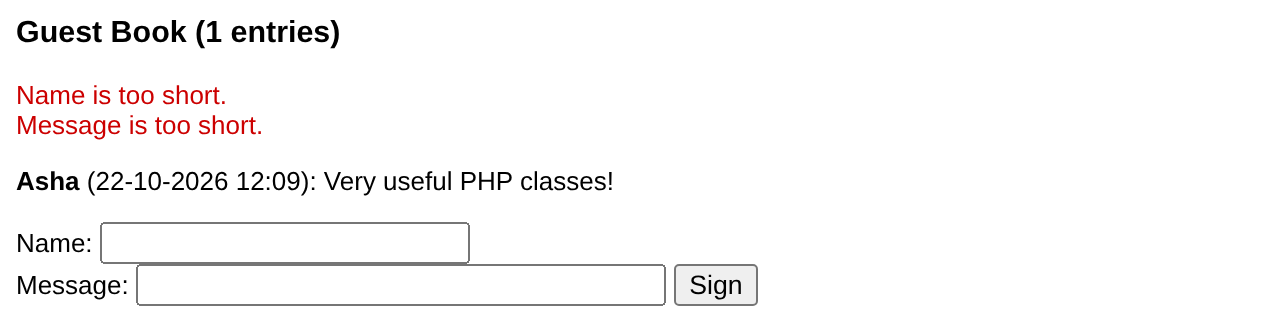
To change the look you edit only guestbook.phtml; to store entries in MySQL you change only GuestBook.phpm; the control page stays the same. Frameworks such as Laravel, Symfony and CodeIgniter are built on exactly this idea.
Key Takeaways
- MVC separates the model (data and logic), the view (presentation) and the controller (user input); an infrastructure glues them.
- Benefits: interchangeable parts, easier debugging and maintenance, several views/controllers for one model.
- On the web, the controller is the user's GET/POST requests, the view is what the browser shows, the model is your classes.
- One big script mixing SQL, HTML and logic is hard to maintain.
- A simple PHP MVC:
.phpcontrol page,.phpmmodel classes,.phtmlview templates, joined byrequire.
Program File
Extract the ZIP into C:\xampp\htdocs. It creates the folder phpbook/ch19 used in the file labels above; open the programs at http://localhost/phpbook/… with Apache (and MySQL, where needed) started in the XAMPP Control Panel.
Question / Answer (15 questions)
MCQ Test : Check Your Understanding (5 questions)
Select an option and press Check Answer, or answer all questions and press Submit Test to see your score. Each answer comes with an explanation.
Bibliography/References
The notes on this page are the author’s own compilation from the e-book PHP: Basics to Advance. Every program was run on Apache with PHP 8 and MariaDB, and the output shown is the real result of that run. The works listed below were consulted and are cited for attribution and further reading. Product names and trademarks belong to their respective owners.
- Fowler, M. (2002). Patterns of Enterprise Application Architecture. Addison-Wesley.
- MDN contributors. (n.d.). MVC. MDN Web Docs Glossary. https://developer.mozilla.org/en-US/docs/Glossary/MVC
- Laravel. (n.d.). Laravel Documentation. https://laravel.com/docs
- The PHP Group. (n.d.). PHP Manual – json_encode. https://www.php.net/manual/en/function.json-encode.php