
Learning Objectives – after this chapter you will be able to:
- Explain AJAX and how its asynchronous model differs from the classic web application model.
- Create and use the
XMLHttpRequestobject:open(),send(),setRequestHeader(),onreadystatechange,readyState,status,responseText,responseXML. - Distinguish synchronous and asynchronous requests and compare XMLHttpRequest with IFrames.
- Build PHP + MySQLi back ends for AJAX: live search, form posting and XML responses.
- Exchange data as JSON with
json_encode(),json_decode()and the modernfetch()API.
What is AJAX?
AJAX – Asynchronous JavaScript And XML – is not a new language but a technique. It describes how existing technologies – JavaScript, the DOM (Document Object Model), XML (or JSON) and the XMLHttpRequest object – are used together to create interactive web applications.
When web applications were first built with these technologies separately, users could not work with them as smoothly as with desktop applications: every click sent the whole page to the server and waited for a complete new page. In 2005 Jesse James Garrett of Adaptive Path gave the combination of JavaScript, XML and the DOM the name AJAX. In this technique the request to the web server is sent with the XMLHttpRequest object, a part of JavaScript, which sends asynchronous requests. The page does not have to be reloaded; only the part that changes is updated, so the application behaves much more like a desktop application. Google Maps, Gmail, search suggestions and "like" buttons all work this way.
The AJAX Web Application Model
The AJAX application removes the start–stop–start–stop nature – the click, wait and refresh – of the classic client/server interaction. An AJAX engine, written in JavaScript, is introduced as an intermediary layer between the user and the web server:
Figure 39.1 – The AJAX web application model
Instead of loading a new page at every step, the browser loads the AJAX engine with the page. The server's response contains data, not presentation; the presentation is applied to that data in the browser. Most of the page does not change. For the web server nothing has changed – it still responds to each request as before.
While JavaScript waits for the server, the user can still type in forms and click buttons. When the server completes its processing, the code updates just the changed part of the page – the user never has to wait. That is the power of asynchronous requests.
Classic (synchronous) model versus AJAX (asynchronous) model
| Aspect | Classic web application | AJAX web application |
|---|---|---|
| Request | Every action loads a complete page | Only data is requested in the background |
| User | Waits while the server processes ("click, wait, refresh") | Continues working while the request runs |
| Data transferred | Whole HTML page every time | Only the needed data (XML/JSON/fragment) |
| Processing | All on the server | Validation, navigation and in-memory editing can be done by the AJAX engine |
| Feel | Page flicker after each action | Smooth, desktop-like |
In the classic model every user action is followed by data transmission and server processing, during which the user waits. In the AJAX model, every user action generates a JavaScript call to the AJAX engine; responses that need no server data (validation, some navigation, editing data in memory) are handled by the engine itself, and when it needs the server it communicates asynchronously, without interrupting the user. The model is not bound to a specific data format, programming language or communication mechanism.
The XMLHttpRequest Object
The key to AJAX is the XMLHttpRequest object, used by JavaScript to send HTTP requests, receive the responses and parse them. Apart from XML, it can fetch data in HTML, JSON or plain text format.
The concept was developed by Microsoft for Outlook Web Access 2000 and shipped as an ActiveX control in Internet Explorer 5. Mozilla, Safari and Opera then implemented a native XMLHttpRequest object, and the W3C/WHATWG standardised a common set of properties and methods. Internet Explorer 7 made it a native object as well.
Creating the object in every modern browser is simply:
var xmlRequest = new XMLHttpRequest();
Old Internet Explorer 5 and 6 needed an ActiveX object, so older books detect the browser first:
function getReq() {
    var xmlRequest;
    if (window.XMLHttpRequest) {                 // IE7+, Firefox, Chrome, Safari, Opera
        xmlRequest = new XMLHttpRequest();
    } else if (window.ActiveXObject) {           // IE6, IE5
        try {
            xmlRequest = new ActiveXObject("Msxml2.XMLHTTP");
        } catch (e) {
            try {
                xmlRequest = new ActiveXObject("Microsoft.XMLHTTP");
            } catch (e) {
                xmlRequest = false;
            }
        }
    }
    return xmlRequest;
}
All current browsers support new XMLHttpRequest() (and the newer fetch()), so the ActiveX branch is no longer needed; it is shown because it appears in much existing code.
Synchronous and asynchronous requests
After creating the object you decide whether the request is synchronous or asynchronous – the third argument of open().
Synchronous (false): after sending the request the script waits until the response arrives – create the object, create the request, send it, hold the processing until the response comes:
var xmlRequest = new XMLHttpRequest();
xmlRequest.open("GET", "address.xml", false);
xmlRequest.send(null);
var xmlDoc = xmlRequest.responseXML;
Asynchronous (true): set the onreadystatechange event to a handler function, open and send the request, and continue processing; the handler is called as the state changes and checks whether the data is ready:
var xmlRequest = new XMLHttpRequest();
xmlRequest.onreadystatechange = asyncHandler;
xmlRequest.open("GET", "address.xml", true);
xmlRequest.send(null);

function asyncHandler() {
    if (xmlRequest.readyState == 4 && xmlRequest.status == 200) {
        var objXML = xmlRequest.responseXML;
    }
}
XMLHttpRequest properties
| Property | Description |
|---|---|
| onreadystatechange | The event handler called at every change of readyState – usually the asynchronous callback. |
| readyState | The state of the request: 0 Uninitialized (open not yet called), 1 Open/Loading (open called, send not yet), 2 Sent (send called, waiting for headers), 3 Receiving/Interactive (part of the data received), 4 Complete/Loaded (all data received). |
| responseText | The response as a string (partial during state 3, complete at state 4). |
| responseXML | The response as an XML document object (if the content type is XML), usable with DOM methods; null otherwise or before state 4. |
| status | The HTTP status code, e.g. 200 (OK), 404 (Not Found), 500 (Server Error). |
| statusText | The HTTP status text, e.g. "OK" or "Not Found". |
XMLHttpRequest methods
| Method | Description |
|---|---|
| open(method, url, async, user, password) | Prepares the request: method (GET, POST, PUT, DELETE, HEAD), URL, true for asynchronous, optional user and password. Sets readyState to 1. |
| send([data]) | Sends the request. For POST, data such as "name=Asha&age=21" is passed here. Sets readyState to 2. |
| setRequestHeader(label, value) | Adds an HTTP header – must be called after open() and before send(), e.g. the Content-Type of POST data. |
| abort() | Cancels the current request and resets the object. |
| getResponseHeader(name) | Returns the value of one response header. |
| getAllResponseHeaders() | Returns all response headers as one string. |
XMLHttpRequest and IFrames
Before XMLHttpRequest became common, IFrames (inline frames) were used to load content from another page into part of a page without reloading the whole page – news clips, calendars, weather forecasts:
<iframe src="date.php" name="my_iframe" frameborder="0" width="500" height="200"
        scrolling="yes"></iframe>
The only required attribute is src (the page shown in the frame); name targets the frame, width/height give its size, scrolling (yes, no, auto) allows scroll bars and frameborder the border. IFrames load whole pages and give little control over the data, while XMLHttpRequest exchanges only data and lets JavaScript decide how to display it – which is why AJAX uses XMLHttpRequest.
Example 1 – Getting Data from PHP
A button asks the server for its current time without reloading the page.
<?php
date_default_timezone_set("Asia/Kolkata");
echo "Server time is " . date("h:i:s A") . " on " . date("d-m-Y");<html>
<body style="font-family:Arial;font-size:13px">
<h3>AJAX demo</h3>
<button id="btn" onclick="loadTime()">Get server time</button>
<p id="result">The answer will appear here.</p>
<p>This paragraph is never reloaded.</p>
<script>
function loadTime() {
var xhr = new XMLHttpRequest();
xhr.onreadystatechange = function () {
if (xhr.readyState == 4 && xhr.status == 200) {
document.getElementById("result").innerHTML = xhr.responseText;
}
};
xhr.open("GET", "servertime.php", true);
xhr.send();
}
</script>
</body>
</html>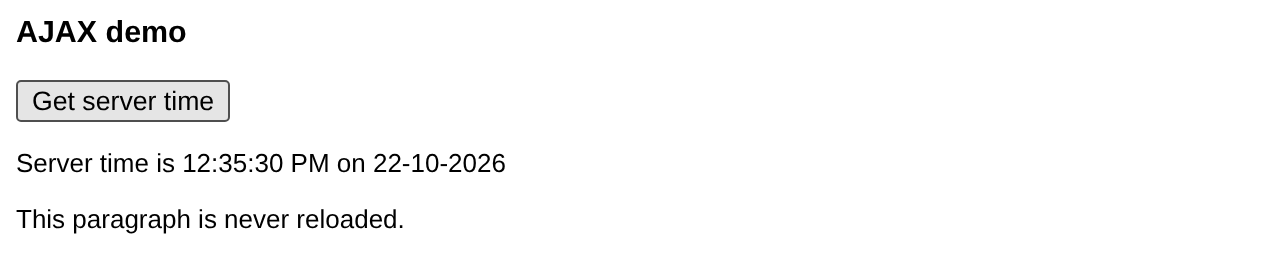
Example 2 – Live Search with PHP and MySQLi
As the user types, the names of matching students are fetched from the database and shown under the box.
<?php
$q = $_GET["q"] ?? "";
if (strlen($q) == 0) exit;
$conn = new mysqli("localhost", "root", "", "phpbook");
$result = $conn->execute_query(
    "SELECT name, city FROM students WHERE name LIKE ? ORDER BY name", ["%$q%"]);
if ($result->num_rows == 0) {
    echo "No suggestion";
}
foreach ($result as $row) {
    echo htmlspecialchars($row["name"]) . " <small>(" . htmlspecialchars($row["city"]) . ")</small><br>";
}<html>
<body style="font-family:Arial;font-size:13px">
Student name: <input type="text" id="q" onkeyup="showHint(this.value)">
<div id="hint" style="border:1px solid #aaa;padding:4px;margin-top:4px;width:260px">
Suggestions:
</div>
<script>
function showHint(str) {
if (str.length == 0) {
document.getElementById("hint").innerHTML = "";
return;
}
var xhr = new XMLHttpRequest();
xhr.onreadystatechange = function () {
if (this.readyState == 4 && this.status == 200) {
document.getElementById("hint").innerHTML = this.responseText;
}
};
xhr.open("GET", "suggest.php?q=" + encodeURIComponent(str), true);
xhr.send();
}
</script>
</body>
</html>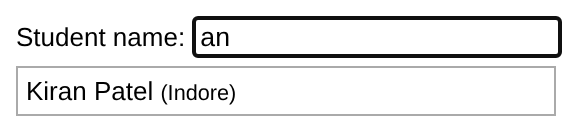
Example 3 – Sending a Form with POST
For POST requests the data is passed to send() and the request needs a Content-Type header, set with setRequestHeader():
<?php
$conn = new mysqli("localhost", "root", "", "phpbook");
$name = trim($_POST["name"] ?? "");
$msg  = trim($_POST["message"] ?? "");
if ($name === "" || $msg === "") {
    http_response_code(400);
    echo "Please fill in both fields.";
    exit;
}
$conn->execute_query("INSERT INTO feedback (name, message) VALUES (?, ?)", [$name, $msg]);
echo "Thank you, " . htmlspecialchars($name) . "! Feedback #" . $conn->insert_id . " saved.";<html>
<body style="font-family:Arial;font-size:13px">
Name: <input id="name"><br>
Message: <input id="message" size="30"><br>
<button id="send" onclick="sendFeedback()">Send</button>
<p id="status" style="color:green"></p>
<script>
function sendFeedback() {
var data = "name=" + encodeURIComponent(document.getElementById("name").value)
+ "&message=" + encodeURIComponent(document.getElementById("message").value);
var xhr = new XMLHttpRequest();
xhr.open("POST", "savefeedback.php", true);
xhr.setRequestHeader("Content-Type", "application/x-www-form-urlencoded");
xhr.onreadystatechange = function () {
if (xhr.readyState == 4) {
document.getElementById("status").innerHTML =
xhr.responseText + " (HTTP " + xhr.status + " " + xhr.statusText + ")";
}
};
xhr.send(data);
}
</script>
</body>
</html>
Example 4 – Reading an XML Response
When the server sends XML (Content-Type: text/xml or application/xml), responseXML contains a parsed document that can be read with DOM methods:
<?php
header("Content-Type: application/xml; charset=UTF-8");
$conn = new mysqli("localhost", "root", "", "phpbook");
$xml = new SimpleXMLElement("<courses/>");
foreach ($conn->query("SELECT course_name, fee FROM courses") as $r) {
    $c = $xml->addChild("course");
    $c->addChild("name", htmlspecialchars($r["course_name"]));
    $c->addChild("fee", $r["fee"]);
}
echo $xml->asXML();<html>
<body style="font-family:Arial;font-size:13px">
<button id="load" onclick="loadCourses()">Load courses</button>
<table id="tbl" border="1" cellpadding="4" style="border-collapse:collapse;margin-top:6px"></table>
<script>
function loadCourses() {
var xhr = new XMLHttpRequest();
xhr.onreadystatechange = function () {
if (xhr.readyState == 4 && xhr.status == 200) {
var doc = xhr.responseXML;
var courses = doc.getElementsByTagName("course");
var html = "<tr><th>Course</th><th>Fee</th></tr>";
for (var i = 0; i < courses.length; i++) {
html += "<tr><td>" + courses[i].getElementsByTagName("name")[0].textContent
+ "</td><td>" + courses[i].getElementsByTagName("fee")[0].textContent + "</td></tr>";
}
document.getElementById("tbl").innerHTML = html;
}
};
xhr.open("GET", "coursesxml.php", true);
xhr.send();
}
</script>
</body>
</html>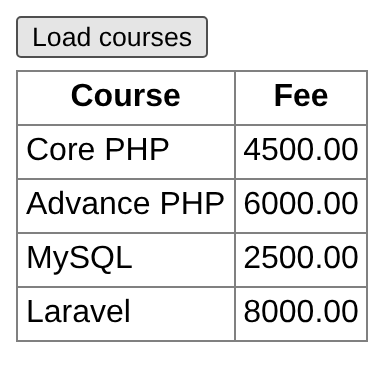
Introduction to JSON
AJAX makes server responses faster by letting client-side scripts retrieve only the required data instead of a complete page. Such responses were originally XML, which then had to be parsed in JavaScript – making the JavaScript code complicated. The idea of JSON (JavaScript Object Notation) is to send the response as a data structure that JavaScript can use directly.
Advantages of JSON
- A lightweight data-interchange format.
- Easy for humans to read and write.
- Easy for machines to parse and generate.
- Parsed in JavaScript with
JSON.parse(). (Old code usedeval(), which is unsafe – never use it on server data.) - Supported by practically every language – ActionScript, C, C#, ColdFusion, Java, JavaScript, ML, Objective CAML, Perl, PHP, Python, Rebol, Ruby, Lua and many more.
JSON syntax
JSON syntax is close to the C family of languages:
- An object starts with
{and ends with}and contains members –"string" : valuepairs separated by commas. - An array is written between
[and], with elements – values separated by commas. - A value can be a string (in double quotes), a number, an object, an array,
true,falseornull.
The same menu in JSON and in XML:
{"menu": {
    "id": "file",
    "value": "File",
    "popup": {
        "menuitem": [
            {"value": "New",   "onclick": "CreateNewDoc()"},
            {"value": "Open",  "onclick": "OpenDoc()"},
            {"value": "Close", "onclick": "CloseDoc()"}
        ]
    }
}}<menu id="file" value="File">
<popup>
<menuitem value="New" onclick="CreateNewDoc()" />
<menuitem value="Open" onclick="OpenDoc()" />
<menuitem value="Close" onclick="CloseDoc()" />
</popup>
</menu>JSON in PHP
PHP converts between PHP values and JSON with json_encode() and json_decode():
<?php
$student = ["roll" => 101, "name" => "Asha", "marks" => [82, 75], "passed" => true, "phone" => null];
$json = json_encode($student);
echo "json_encode: $json<br>";
echo "Pretty:<pre>" . json_encode($student, JSON_PRETTY_PRINT) . "</pre>";
$text = '{"city":"Bhopal","pin":462011,"tags":["lakes","capital"]}';
$obj = json_decode($text);                 // object
$arr = json_decode($text, true);           // associative array
echo "json_decode as object: $obj->city, " . $obj->tags[0] . "<br>";
echo "json_decode as array: {$arr['pin']}<br>";
json_decode('{bad json}');
echo "Invalid JSON: " . json_last_error_msg();
?>json_encode: {"roll":101,"name":"Asha","marks":[82,75],"passed":true,"phone":null}
Pretty:
{
"roll": 101,
"name": "Asha",
"marks": [
82,
75
],
"passed": true,
"phone": null
}
json_decode as object: Bhopal, lakes
json_decode as array: 462011
Invalid JSON: Syntax errorExample 5 – A JSON API with fetch()
Modern JavaScript offers fetch(), a simpler, promise-based replacement for XMLHttpRequest. The PHP script sends JSON with the header Content-Type: application/json:
<?php
header("Content-Type: application/json");
$conn = new mysqli("localhost", "root", "", "phpbook");
$city = $_GET["city"] ?? "";
$rows = $conn->execute_query(
    "SELECT roll, name, city FROM students WHERE city LIKE ? ORDER BY roll", ["%$city%"]
)->fetch_all(MYSQLI_ASSOC);
echo json_encode(["count" => count($rows), "students" => $rows]);{"count":2,"students":[{"roll":102,"name":"Ravi Kumar","city":"Indore"},{"roll":105,"name":"Kiran Patel","city":"Indore"}]}<html>
<head><meta charset="utf-8"></head>
<body style="font-family:Arial;font-size:13px">
City:
<select id="city" onchange="load(this.value)">
<option value="">All</option><option>Bhopal</option><option>Indore</option>
</select>
<ul id="list"></ul>
<script>
async function load(city) {
const response = await fetch("api_students.php?city=" + encodeURIComponent(city));
const data = await response.json(); // parses the JSON
let html = "<b>" + data.count + " student(s)</b>";
for (const s of data.students) {
html += "<li>" + s.roll + " – " + s.name + " (" + s.city + ")</li>";
}
document.getElementById("list").innerHTML = html;
}
load("");
</script>
</body>
</html>
Key Takeaways
- AJAX = Asynchronous JavaScript And XML – a technique that updates part of a page by exchanging data with the server in the background.
- The AJAX engine sits between the user and the server; users keep working while requests run.
- XMLHttpRequest:
open(method, url, async),setRequestHeader(),send(data),onreadystatechange,readyState(0–4),status,responseText,responseXML. - Asynchronous requests (
true) do not block the page; synchronous ones do. - PHP returns plain text, HTML fragments, XML or JSON; use prepared statements in AJAX back ends too.
- JSON is lighter than XML:
json_encode()/json_decode()in PHP,JSON.parse()/response.json()in JavaScript;fetch()is the modern alternative to XMLHttpRequest.
Program File
Extract the ZIP into C:\xampp\htdocs. It creates the folder phpbook/ch39 used in the file labels above; open the programs at http://localhost/phpbook/… with Apache (and MySQL, where needed) started in the XAMPP Control Panel.
Question / Answer (15 questions)
MCQ Test : Check Your Understanding (5 questions)
Select an option and press Check Answer, or answer all questions and press Submit Test to see your score. Each answer comes with an explanation.
Bibliography/References
The notes on this page are the author’s own compilation from the e-book PHP: Basics to Advance. Every program was run on Apache with PHP 8 and MariaDB, and the output shown is the real result of that run. The works listed below were consulted and are cited for attribution and further reading. Product names and trademarks belong to their respective owners.
- Garrett, J. J. (2005). Ajax: A New Approach to Web Applications. Adaptive Path.
- WHATWG. (n.d.). XMLHttpRequest Standard. https://xhr.spec.whatwg.org/
- MDN contributors. (n.d.). Using the Fetch API. MDN Web Docs. https://developer.mozilla.org/en-US/docs/Web/API/Fetch_API/Using_Fetch
- ECMA International. (2017). ECMA-404: The JSON Data Interchange Syntax. https://www.ecma-international.org/publications-and-standards/standards/ecma-404/
- The PHP Group. (n.d.). PHP Manual – JSON Functions. https://www.php.net/manual/en/ref.json.php