
Learning Objectives – after this chapter you will be able to:
- Send e-mail from a PHP script with the
mail()function and its parameters. - Add headers such as From, Cc, Reply-To and Content-Type for HTML mail.
- Build a feedback (contact) form that sends mail.
- Configure XAMPP to send mail through an SMTP server or to save mail to disk for testing.
- Protect mail forms against header injection.
The mail() Function
The PHP mail() function is used to send e-mails from inside a script.
mail(to, subject, message, headers, parameters)
| Parameter | Description |
|---|---|
| to | Required. The receiver or receivers of the e-mail (comma-separated). |
| subject | Required. The subject of the e-mail. It cannot contain newline characters. |
| message | Required. The message to be sent. Lines should be separated with \n and should not exceed 70 characters. |
| headers | Optional. Additional headers such as From, Cc and Bcc, separated with CRLF (\r\n). In PHP 8 this may also be an associative array. |
| parameters | Optional. Additional parameters passed to the sendmail program. |
mail() returns true if the mail was accepted for delivery by the mail system, and false otherwise. "Accepted" does not guarantee that the message reaches the inbox.
For mail() to work, PHP needs an installed and working e-mail system. The program used is defined by settings in php.ini – SMTP, smtp_port and sendmail_from on Windows, sendmail_path on Linux. See "Configuring mail in XAMPP" below.
Sending a Simple E-Mail
The simplest way to send an e-mail with PHP is to send a text e-mail. In the example below we first declare the variables ($to, $subject, $message, $from, $headers), then use them in mail():
<?php
$to = "someone@example.com";
$subject = "Test mail";
$message = "Hello! This is a simple email message.";
$from = "someonelse@example.com";
$headers = "From: $from";
if (mail($to, $subject, $message, $headers)) {
    echo "Mail Sent.";
} else {
    echo "Mail could not be sent.";
}
?>Mail Sent.
The test server used for this book is configured like XAMPP's mailToDisk option: instead of being delivered over the Internet, each message is saved as a file in the mailoutput folder, so you can open and inspect exactly what was sent. With a real SMTP server configured, the same scripts deliver the mail.
Sending HTML Mail with Several Headers
To send HTML mail you must set the MIME-Version and Content-type headers. Headers are separated by \r\n; in PHP 8 you may pass them as an array instead.
<?php
$to = "student@example.com";
$subject = "Admission confirmed";
$message = "
<html>
<body>
  <h2>Welcome to the PHP batch!</h2>
  <p>Your classes start on <b>2 November</b> at 10 a.m.</p>
</body>
</html>";
$headers = [
    "MIME-Version" => "1.0",
    "Content-type" => "text/html; charset=UTF-8",
    "From"         => "Admissions <admissions@example.com>",
    "Cc"           => "office@example.com",
    "Reply-To"     => "help@example.com",
];
$ok = mail($to, $subject, $message, $headers);
echo $ok ? "HTML mail accepted for delivery." : "Sending failed.";
?>HTML mail accepted for delivery.
The message file saved by the test server shows the headers PHP generated:
<?php
// Show the newest message saved in the mail output folder (test setup only)
$files = glob("/opt/lampp/mailoutput/*.eml");
sort($files);
$last = end($files);
echo "<pre>" . htmlspecialchars(file_get_contents($last)) . "</pre>";
?>To: student@example.com Subject: Admission confirmed MIME-Version: 1.0 Content-type: text/html; charset=UTF-8 From: Admissions <admissions@example.com> Cc: office@example.com Reply-To: help@example.com <html> <body> <h2>Welcome to the PHP batch!</h2> <p>Your classes start on <b>2 November</b> at 10 a.m.</p> </body> </html>
A PHP Mail (Feedback) Form
With PHP you can create a feedback form on your web site. The example below sends a text message to a specified e-mail address:
<html>
<body style="font-family:Arial;font-size:13px">
<?php
if (isset($_REQUEST['email'])) {
    // if "email" is filled out, send email
    $email   = $_REQUEST['email'];
    $subject = $_REQUEST['subject'];
    $message = $_REQUEST['message'];
    mail("someone@example.com", "Subject: $subject", $message, "From: $email");
    echo "Thank you for using our mail form";
} else {
    // if "email" is not filled out, display the form
    echo "<form method='post' action='mailform.php'>
    Email: <input name='email' type='text'><br>
    Subject: <input name='subject' type='text'><br>
    Message:<br>
    <textarea name='message' rows='6' cols='40'></textarea><br>
    <input type='submit'>
    </form>";
}
?>
</body>
</html>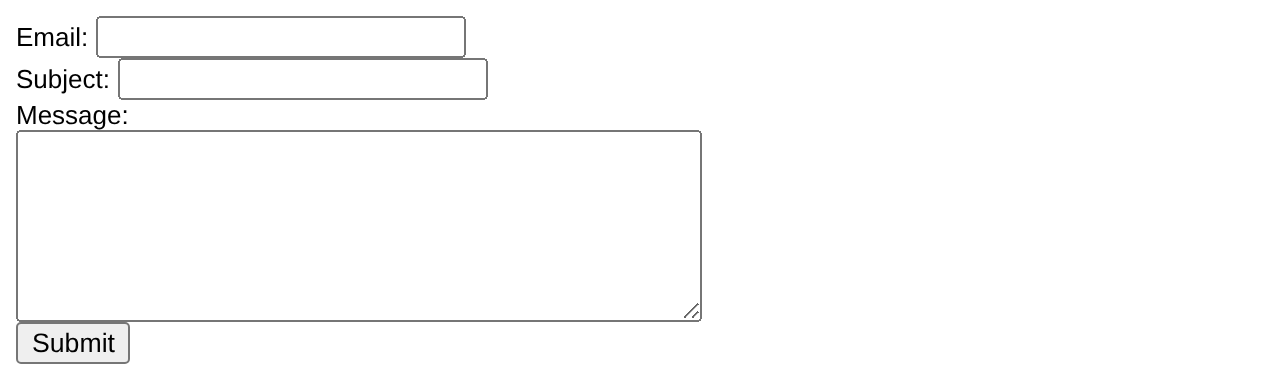
Thank you for using our mail form
This is how the example works:
- First, check whether the e-mail input field is filled out.
- If it is not set (as when the page is first visited), output the HTML form.
- If it is set (after the form is filled out), send the e-mail from the form.
- When Submit is pressed, the page reloads, sees that the e-mail input is set, and sends the e-mail.
Securing the Mail Form – Header Injection
The form above is the simplest way to send e-mail, but it is not secure. A spammer can type a value such as someone@example.com%0ABcc: victim1@x.com, victim2@x.com into the Email field. Because the field is placed in the From: header, the hidden newline adds a Bcc header – and your server sends spam to many people. This is called e-mail header injection.
The cure is to validate the input: the e-mail field must be a single valid address, and fields that go into headers must not contain newlines. filter_var() (Chapter 21) does this easily:
<?php
function spamcheck($field)
{
    // remove illegal characters, then validate
    $field = filter_var($field, FILTER_SANITIZE_EMAIL);
    return filter_var($field, FILTER_VALIDATE_EMAIL) !== false;
}
if (isset($_POST['email'])) {
    $email = $_POST['email'];
    if (!spamcheck($email) || preg_match("/[\r\n]/", $email . $_POST['subject'])) {
        echo "Invalid input – mail not sent.";
    } else {
        mail("someone@example.com", $_POST['subject'], $_POST['message'], "From: $email");
        echo "Thank you for using our mail form";
    }
}
?>Invalid input – mail not sent.
Configuring Mail in XAMPP
A fresh XAMPP installation cannot deliver e-mail to the Internet by itself. Choose one of these options:
Option 1 – Save mails to disk (testing)
XAMPP for Windows includes the mailToDisk tool. In php.ini enable:
[mail function]
sendmail_path = "C:\xampp\mailtodisk\mailtodisk.exe"
Restart Apache. Every message sent with mail() is written as a file into C:\xampp\mailoutput, where you can open it with any text editor.
Option 2 – Send through a real SMTP server
XAMPP also ships "fake sendmail" (C:\xampp\sendmail\sendmail.exe), which forwards mail to an SMTP server such as your hosting company's or Gmail's.
[mail function]
sendmail_path = "\"C:\xampp\sendmail\sendmail.exe\" -t"
[sendmail]
smtp_server=smtp.gmail.com
smtp_port=587
smtp_ssl=tls
auth_username=yourname@gmail.com
auth_password=your-16-character-app-password
force_sender=yourname@gmail.com
For Gmail, two-step verification must be on and you must create an app password; your normal Gmail password will not work. Restart Apache after editing both files.
For attachments, SMTP authentication from PHP code and reliable HTML mail, most projects use a library such as PHPMailer or Symfony Mailer (installed with Composer) instead of mail().
Key Takeaways
mail(to, subject, message, headers, parameters)sends mail; it returns true when the mail system accepts it.- Headers (From, Cc, Bcc, Reply-To, MIME-Version, Content-type) are separated by
\r\nor given as an array in PHP 8. - HTML mail needs
MIME-Version: 1.0andContent-type: text/html. - A mail form must validate input to stop header injection – use
filter_var()and reject newlines. - In XAMPP, configure mailToDisk for testing or fake sendmail + SMTP for real delivery.
Program File
Extract the ZIP into C:\xampp\htdocs. It creates the folder phpbook/ch15 used in the file labels above; open the programs at http://localhost/phpbook/… with Apache (and MySQL, where needed) started in the XAMPP Control Panel.
Question / Answer (15 questions)
MCQ Test : Check Your Understanding (5 questions)
Select an option and press Check Answer, or answer all questions and press Submit Test to see your score. Each answer comes with an explanation.
Bibliography/References
The notes on this page are the author’s own compilation from the e-book PHP: Basics to Advance. Every program was run on Apache with PHP 8 and MariaDB, and the output shown is the real result of that run. The works listed below were consulted and are cited for attribution and further reading. Product names and trademarks belong to their respective owners.
- The PHP Group. (n.d.). PHP Manual – mail. https://www.php.net/manual/en/function.mail.php
- The PHP Group. (n.d.). PHP Manual – Mail runtime configuration. https://www.php.net/manual/en/mail.configuration.php
- The PHP Group. (n.d.). PHP Manual – Validate filters. https://www.php.net/manual/en/filter.filters.validate.php
- PHPMailer contributors. (n.d.). PHPMailer. GitHub. https://github.com/PHPMailer/PHPMailer
- Google. (n.d.). Sign in with app passwords. Google Account Help. https://support.google.com/accounts/answer/185833