
Learning Objectives – after this chapter you will be able to:
- Connect to MariaDB/MySQL with
mysqli_connect()and handle connection errors. - Create tables and insert, select, update, delete and search records with
mysqli_query(). - Fetch rows with
mysqli_fetch_array(),mysqli_fetch_assoc(),mysqli_fetch_row(),mysqli_fetch_object()andmysqli_fetch_all(). - Use
mysqli_num_rows(),mysqli_affected_rows(),mysqli_insert_id()andmysqli_error(). - Understand PHP 8.1's exception-based error reporting and build a complete CRUD page.
MySQLi – Procedural Interface
MySQLi ("MySQL improved") is PHP's extension for MySQL and MariaDB. It offers two interfaces with the same features: a procedural interface – plain functions whose names start with mysqli_ – and an object-oriented interface (Chapter 35). The procedural style looks very much like the classic mysql_* code of Chapter 33, so it is the easiest way to convert old programs: add an i and pass the connection as the first argument.
Every program in this chapter is the working version of the classic listing with the same number in Chapter 33 (Program 34.3 = Listing L33.3). The database phpbook with the tables courses and students was created in Chapter 32.
| Function | Purpose |
|---|---|
| mysqli_connect(host, user, pass, db, port) | Opens a connection; returns the connection object. |
| mysqli_connect_error() / mysqli_connect_errno() | Message / number of the connection error. |
| mysqli_select_db($c, db) | Changes the default database. |
| mysqli_query($c, sql) | Executes an SQL statement; returns a result for SELECT, true for other statements. |
| mysqli_fetch_array($r [, mode]) | One row as an array – MYSQLI_BOTH (default), MYSQLI_ASSOC or MYSQLI_NUM. |
| mysqli_fetch_assoc($r) / mysqli_fetch_row($r) | One row as an associative / numeric array. |
| mysqli_fetch_object($r) | One row as an object ($row->name). |
| mysqli_fetch_all($r [, mode]) | All rows as an array of arrays. |
| mysqli_num_rows($r) / mysqli_num_fields($r) | Number of rows / columns of a result. |
| mysqli_affected_rows($c) | Rows changed by the last INSERT/UPDATE/DELETE. |
| mysqli_insert_id($c) | AUTO_INCREMENT id of the last INSERT. |
| mysqli_real_escape_string($c, str) | Escapes special characters for use in SQL. |
| mysqli_error($c) / mysqli_errno($c) | Error message / number of the last statement. |
| mysqli_free_result($r) / mysqli_close($c) | Frees a result / closes the connection. |
Program 34.1 – Connecting to the Server
<?php
$host = "localhost";
$user = "root";
$pass = "";
$conn = mysqli_connect($host, $user, $pass);
echo "Connected successfully<br>";
echo "Host info: " . mysqli_get_host_info($conn) . "<br>";
echo "Server version: " . mysqli_get_server_info($conn);
mysqli_close($conn);
?>
Connected successfully
Host info: Localhost via UNIX socket
Server version: 10.11.14-MariaDB-0ubuntu0.24.04.1
Connection errors in PHP 8
Since PHP 8.1, MySQLi reports errors by throwing exceptions of the class mysqli_sql_exception (the default setting is mysqli_report(MYSQLI_REPORT_ERROR | MYSQLI_REPORT_STRICT)). With a wrong password the script therefore stops with an uncaught exception – the old pattern or die(mysqli_connect_error()) is never reached:
<?php
$conn = mysqli_connect("localhost", "root", "wrongpass")
    or die("Could not connect: " . mysqli_connect_error());
echo "Connected";
?>Fatal error: Uncaught mysqli_sql_exception: Access denied for user 'root'@'localhost' (using password: YES) in /opt/lampp/htdocs/phpbook/ch34/connect_wrong.php:2 Stack trace: #0 /opt/lampp/htdocs/phpbook/ch34/connect_wrong.php(2): mysqli_connect() #1 {main} thrown in /opt/lampp/htdocs/phpbook/ch34/connect_wrong.php on line 2The correct way is to catch the exception and show a friendly message (and log the details):
<?php
try {
    $conn = mysqli_connect("localhost", "root", "wrongpass", "phpbook");
    echo "Connected";
} catch (mysqli_sql_exception $e) {
    error_log($e->getMessage());                       // details for the developer
    echo "Sorry, the database is not available right now.<br>";
    echo "(Error " . $e->getCode() . ")";
}
?>Sorry, the database is not available right now. (Error 1045)
Put the connection code in a file such as db.php and require_once it in every page. This is the file used by the rest of this chapter.
<?php
$conn = mysqli_connect("localhost", "root", "", "phpbook");
mysqli_set_charset($conn, "utf8mb4");
Program 34.2 – Selecting the Database
With MySQLi the database can be given as the fourth argument of mysqli_connect(). mysqli_select_db() changes it later:
<?php
$conn = mysqli_connect("localhost", "root", "");
mysqli_select_db($conn, "phpbook");
$r = mysqli_query($conn, "SELECT DATABASE() AS db");
$row = mysqli_fetch_assoc($r);
echo "Database " . $row['db'] . " selected";
mysqli_close($conn);
?>Database phpbook selected
Program 34.3 – Creating a Table
<?php
require_once "db.php";
mysqli_query($conn, "DROP TABLE IF EXISTS enquiry");
$sql = "CREATE TABLE IF NOT EXISTS enquiry (
          id INT AUTO_INCREMENT PRIMARY KEY,
          name VARCHAR(50) NOT NULL,
          mobile VARCHAR(10),
          course VARCHAR(30),
          enquired_on DATETIME DEFAULT CURRENT_TIMESTAMP)";
if (mysqli_query($conn, $sql)) {
    echo "Table enquiry created";
}
mysqli_close($conn);
?>Table enquiry created
Program 34.4 – Inserting Records from a Form
<form action="insert.php" method="post" style="font-family:Arial;font-size:13px">
  Name: <input name="name" id="name"><br>
  Mobile: <input name="mobile" id="mobile"><br>
  Course: <select name="course" id="course">
            <option>Core PHP</option><option>Advance PHP</option><option>Laravel</option>
          </select><br>
  <input type="submit" value="Save" id="save">
</form><?php
require_once "db.php";
$name = mysqli_real_escape_string($conn, $_POST['name']);
$mobile = mysqli_real_escape_string($conn, $_POST['mobile']);
$course = mysqli_real_escape_string($conn, $_POST['course']);
$sql = "INSERT INTO enquiry (name, mobile, course)
VALUES ('$name', '$mobile', '$course')";
if (mysqli_query($conn, $sql)) {
echo "Record saved. Enquiry number: " . mysqli_insert_id($conn);
}
mysqli_close($conn);
?>Record saved. Enquiry number: 1
Two more enquiries are added the same way:
Record saved. Enquiry number: 2
mysqli_real_escape_string() escaped the apostrophe in O'Brien; without it the SQL statement would break. Chapter 36 shows the better solution – prepared statements.
Program 34.5 – Retrieving Data
mysqli_query() returns a result set; mysqli_fetch_array() in a while loop reads it row by row and returns null when no rows are left.
<?php
require_once "db.php";
$result = mysqli_query($conn, "SELECT roll, name, city FROM students ORDER BY roll");
echo "Total students: " . mysqli_num_rows($result) . "<br>";
echo "<table border='1' cellpadding='4' style='border-collapse:collapse;font-family:Arial;font-size:13px'>";
echo "<tr><th>Roll</th><th>Name</th><th>City</th></tr>";
while ($row = mysqli_fetch_array($result)) {
    echo "<tr><td>" . $row['roll'] . "</td><td>" . $row['name']
       . "</td><td>" . $row[2] . "</td></tr>";
}
echo "</table>";
mysqli_free_result($result);
mysqli_close($conn);
?>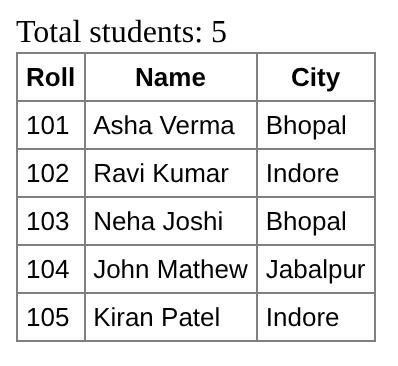
As before, each row is available by column name ($row['name']) and by number ($row[2]).
Program 34.6 – Updating Records
<?php
require_once "db.php";
mysqli_query($conn, "UPDATE students SET city = 'Sehore' WHERE roll = 103");
echo mysqli_affected_rows($conn) . " record(s) updated<br>";
$r = mysqli_query($conn, "SELECT name, city FROM students WHERE roll = 103");
$row = mysqli_fetch_assoc($r);
echo "Now: {$row['name']} lives in {$row['city']}";
mysqli_close($conn);
?>1 record(s) updated Now: Neha Joshi lives in Sehore
Program 34.7 – Deleting Records
<?php
require_once "db.php";
$roll = (int) $_GET['roll'];               // cast to int – only a number can reach the SQL
mysqli_query($conn, "DELETE FROM enquiry WHERE id = $roll");
echo mysqli_affected_rows($conn) . " record(s) deleted<br>";
$r = mysqli_query($conn, "SELECT id, name FROM enquiry");
while ($row = mysqli_fetch_row($r)) {
    echo "Remaining: #$row[0] $row[1]<br>";
}
mysqli_close($conn);
?>1 record(s) deleted Remaining: #1 Sunita Rao Remaining: #3 Meena Sahu
Program 34.8 – Searching with a Form
<?php
require_once "db.php";
$city = mysqli_real_escape_string($conn, $_GET['city'] ?? '');
?>
<form style="font-family:Arial;font-size:13px">
  City: <input name="city" value="<?= htmlspecialchars($city) ?>"> <input type="submit" value="Search">
</form>
<?php
$result = mysqli_query($conn, "SELECT name, city FROM students WHERE city LIKE '%$city%'");
if (mysqli_num_rows($result) == 0) {
    echo "No student found";
}
while ($row = mysqli_fetch_assoc($result)) {
    echo htmlspecialchars($row['name']) . " – " . htmlspecialchars($row['city']) . "<br>";
}
mysqli_close($conn);
?>
The Fetch Functions Compared
<?php
require_once "db.php";
$sql = "SELECT roll, name FROM students ORDER BY roll LIMIT 3";
echo "<pre>";
$r = mysqli_query($conn, $sql);
echo "mysqli_fetch_row:    "; print_r(mysqli_fetch_row($r));
echo "mysqli_fetch_assoc:  "; print_r(mysqli_fetch_assoc($r));
$obj = mysqli_fetch_object($r);
echo "mysqli_fetch_object: roll = $obj->roll, name = $obj->name\n\n";
$r = mysqli_query($conn, $sql);
echo "mysqli_fetch_array(MYSQLI_BOTH): "; print_r(mysqli_fetch_array($r, MYSQLI_BOTH));
$r = mysqli_query($conn, $sql);
$all = mysqli_fetch_all($r, MYSQLI_ASSOC);
echo "mysqli_fetch_all: " . count($all) . " rows, last = " . $all[2]['name'] . "\n";
echo "Columns: ";
foreach (mysqli_fetch_fields($r) as $f) echo $f->name . " ";
echo "</pre>";
mysqli_close($conn);
?>
mysqli_fetch_row:    Array
(
    [0] => 101
    [1] => Asha Verma
)
mysqli_fetch_assoc:  Array
(
    [roll] => 102
    [name] => Ravi Kumar
)
mysqli_fetch_object: roll = 103, name = Neha Joshi

mysqli_fetch_array(MYSQLI_BOTH): Array
(
    [0] => 101
    [roll] => 101
    [1] => Asha Verma
    [name] => Asha Verma
)
mysqli_fetch_all: 3 rows, last = Neha Joshi
Columns: roll name
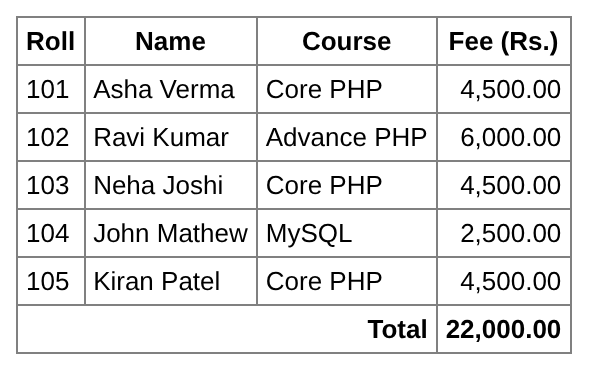
Joining Tables
<?php
require_once "db.php";
$sql = "SELECT s.roll, s.name, c.course_name, c.fee
        FROM students s
        LEFT JOIN courses c ON s.course_id = c.course_id
        ORDER BY s.roll";
$result = mysqli_query($conn, $sql);
echo "<table border='1' cellpadding='4' style='border-collapse:collapse;font-family:Arial;font-size:13px'>";
echo "<tr><th>Roll</th><th>Name</th><th>Course</th><th>Fee (Rs.)</th></tr>";
$total = 0;
while ($row = mysqli_fetch_assoc($result)) {
    $total += $row['fee'];
    echo "<tr><td>{$row['roll']}</td><td>{$row['name']}</td>"
       . "<td>{$row['course_name']}</td><td align='right'>" . number_format($row['fee'], 2) . "</td></tr>";
}
echo "<tr><th colspan='3' align='right'>Total</th><th align='right'>" . number_format($total, 2) . "</th></tr></table>";
mysqli_close($conn);
?>
Handling Query Errors
A wrong SQL statement also throws a mysqli_sql_exception. mysqli_error() and mysqli_errno() are still useful when exceptions are switched off with mysqli_report(MYSQLI_REPORT_OFF) (the PHP 8.0 and older behaviour):
<?php
require_once "db.php";
try {
    mysqli_query($conn, "SELECT * FROM student");          // wrong table name
} catch (mysqli_sql_exception $e) {
    echo "Exception " . $e->getCode() . ": " . $e->getMessage() . "<br>";
}
mysqli_report(MYSQLI_REPORT_OFF);                         // old style: no exceptions
$r = mysqli_query($conn, "SELEC name FROM students");      // syntax error
if (!$r) {
    echo "mysqli_errno: " . mysqli_errno($conn) . "<br>";
    echo "mysqli_error: " . mysqli_error($conn);
}
mysqli_close($conn);
?>Exception 1146: Table 'phpbook.student' doesn't exist mysqli_errno: 1064 mysqli_error: You have an error in your SQL syntax; check the manual that corresponds to your MariaDB server version for the right syntax to use near 'SELEC name FROM students' at line 1
Several Statements at Once – mysqli_multi_query()
<?php
require_once "db.php";
$sql = "SELECT COUNT(*) FROM students;
        SELECT COUNT(*) FROM courses;
        SELECT MAX(fee) FROM courses";
$labels = ["Students", "Courses", "Highest fee"];
$i = 0;
if (mysqli_multi_query($conn, $sql)) {
    do {
        if ($result = mysqli_store_result($conn)) {
            $row = mysqli_fetch_row($result);
            echo $labels[$i++] . ": " . $row[0] . "<br>";
            mysqli_free_result($result);
        }
    } while (mysqli_next_result($conn));
}
mysqli_close($conn);
?>Students: 5 Courses: 4 Highest fee: 8000.00
Multiple statements are powerful but dangerous: if user input ever reaches mysqli_multi_query(), an attacker can append a second statement (for example DROP TABLE). mysqli_query() runs only one statement, which is one more reason to prefer it.
A Complete CRUD Page – Procedural Style
CRUD stands for Create, Read, Update and Delete – the four basic operations of every data-driven application. The page below manages the courses table on a single page: it lists all courses, adds a new course, edits an existing one and deletes one.
<?php
require_once "db.php";
$msg = "";
$edit = ["course_id" => "", "course_name" => "", "duration" => "", "fee" => ""];

// CREATE or UPDATE
if ($_SERVER["REQUEST_METHOD"] == "POST") {
    $id   = (int) ($_POST["course_id"] ?? 0);
    $name = mysqli_real_escape_string($conn, trim($_POST["course_name"]));
    $dur  = mysqli_real_escape_string($conn, trim($_POST["duration"]));
    $fee  = (float) $_POST["fee"];
    if ($id > 0) {
        mysqli_query($conn, "UPDATE courses SET course_name='$name', duration='$dur', fee=$fee
                             WHERE course_id=$id");
        $msg = "Course updated (" . mysqli_affected_rows($conn) . " row).";
    } else {
        mysqli_query($conn, "INSERT INTO courses (course_name, duration, fee)
                             VALUES ('$name', '$dur', $fee)");
        $msg = "Course added with id " . mysqli_insert_id($conn) . ".";
    }
}
// DELETE
if (isset($_GET["delete"])) {
    $id = (int) $_GET["delete"];
    mysqli_query($conn, "DELETE FROM courses WHERE course_id=$id");
    $msg = "Course deleted.";
}
// load a course into the form for editing
if (isset($_GET["edit"])) {
    $id = (int) $_GET["edit"];
    $r = mysqli_query($conn, "SELECT * FROM courses WHERE course_id=$id");
    $edit = mysqli_fetch_assoc($r) ?? $edit;
}
// READ
$result = mysqli_query($conn, "SELECT * FROM courses ORDER BY course_id");
?>
<html><body style="font-family:Arial;font-size:13px">
<h3>Courses</h3>
<p style="color:green"><?= $msg ?></p>
<form method="post" action="courses.php">
  <input type="hidden" name="course_id" value="<?= $edit['course_id'] ?>">
  Name <input id="course_name" name="course_name" size="12" value="<?= htmlspecialchars($edit['course_name']) ?>">
  Duration <input id="duration" name="duration" size="8" value="<?= htmlspecialchars($edit['duration']) ?>">
  Fee <input id="fee" name="fee" size="6" value="<?= $edit['fee'] ?>">
  <input type="submit" id="save" value="<?= $edit['course_id'] ? 'Update' : 'Add' ?>">
</form><br>
<table border="1" cellpadding="4" style="border-collapse:collapse">
<tr><th>Id</th><th>Course</th><th>Duration</th><th>Fee</th><th>Action</th></tr>
<?php while ($row = mysqli_fetch_assoc($result)): ?>
<tr>
  <td><?= $row['course_id'] ?></td>
  <td><?= htmlspecialchars($row['course_name']) ?></td>
  <td><?= htmlspecialchars($row['duration']) ?></td>
  <td align="right"><?= $row['fee'] ?></td>
  <td><a href="courses.php?edit=<?= $row['course_id'] ?>">Edit</a> |
      <a href="courses.php?delete=<?= $row['course_id'] ?>">Delete</a></td>
</tr>
<?php endwhile; ?>
</table>
</body></html>
<?php mysqli_close($conn); ?>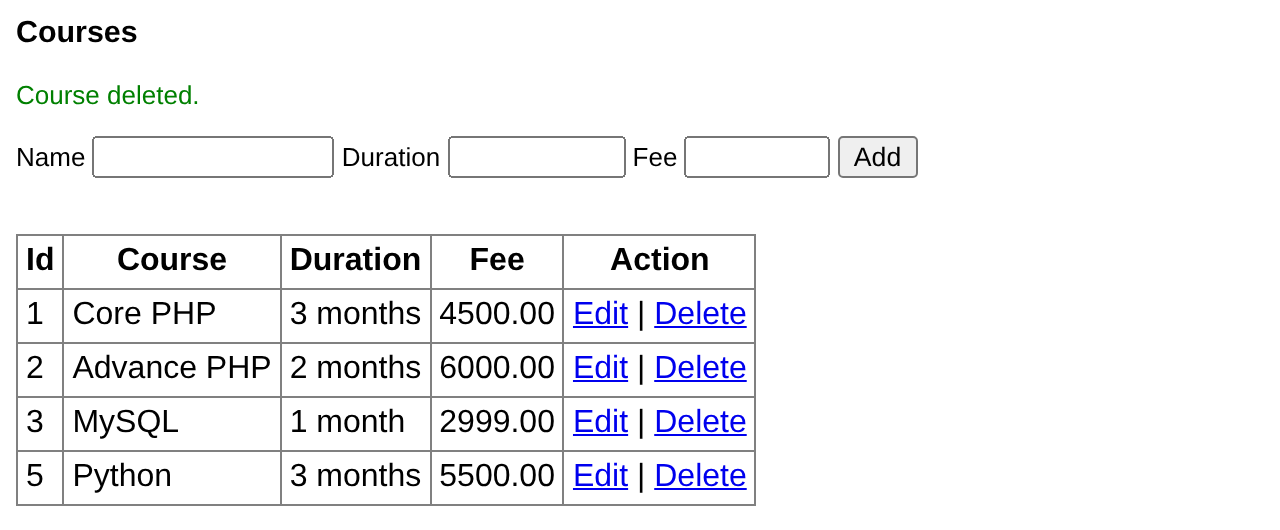
Deleting through a GET link is acceptable for a classroom example. In a real application deleting should be done with a POST form, protected by login and a confirmation – and all SQL should use prepared statements (Chapter 36).
Key Takeaways
- MySQLi procedural functions start with
mysqli_and take the connection as the first argument. mysqli_connect(host, user, pass, db)connects and selects the database; keep it indb.php.- Since PHP 8.1 MySQLi throws
mysqli_sql_exceptionon errors – usetry/catch. mysqli_query()runs SQL; fetch rows withmysqli_fetch_array/assoc/row/object/allin a loop.mysqli_num_rows(),mysqli_affected_rows()andmysqli_insert_id()report results.- Escape input with
mysqli_real_escape_string()or cast numbers – prepared statements are better. - A CRUD page combines INSERT, SELECT, UPDATE and DELETE.
Program File
Extract the ZIP into C:\xampp\htdocs. It creates the folder phpbook/ch34 used in the file labels above; open the programs at http://localhost/phpbook/… with Apache (and MySQL, where needed) started in the XAMPP Control Panel.
Question / Answer (15 questions)
MCQ Test : Check Your Understanding (5 questions)
Select an option and press Check Answer, or answer all questions and press Submit Test to see your score. Each answer comes with an explanation.
Bibliography/References
The notes on this page are the author’s own compilation from the e-book PHP: Basics to Advance. Every program was run on Apache with PHP 8 and MariaDB, and the output shown is the real result of that run. The works listed below were consulted and are cited for attribution and further reading. Product names and trademarks belong to their respective owners.
- The PHP Group. (n.d.). PHP Manual – MySQLi Quick start guide. https://www.php.net/manual/en/mysqli.quickstart.php
- The PHP Group. (n.d.). PHP Manual – mysqli_connect / mysqli::__construct. https://www.php.net/manual/en/mysqli.construct.php
- The PHP Group. (n.d.). PHP Manual – mysqli_result class. https://www.php.net/manual/en/class.mysqli-result.php
- The PHP Group. (n.d.). PHP Manual – mysqli_report. https://www.php.net/manual/en/mysqli-driver.report-mode.php
- The PHP Group. (n.d.). PHP Manual – Multiple Statements. https://www.php.net/manual/en/mysqli.quickstart.multiple-statement.php