
Learning Objectives – after this chapter you will be able to:
- Repeat code with
while,do…while,forandforeach. - Choose the right loop for a task.
- Control loops with
breakandcontinue. - Write nested loops, for example to print a multiplication table.
Looping
Loops execute a block of code a specified number of times, or while a specified condition is true. Often when you write code you want the same block to run over and over again. Instead of adding several almost equal lines to a script, we use loops. In PHP we have the following looping statements:
- while – loops through a block of code while a specified condition is true.
- do…while – loops through a block of code once, and then repeats the loop as long as a specified condition is true.
- for – loops through a block of code a specified number of times.
- foreach – loops through a block of code for each element in an array.
The while Loop
The while loop executes a block of code while a condition is true. The condition is checked before each repetition, so if it is false at the start the body never runs (an entry-controlled loop).
while (condition) {
    code to be executed;
}
The example below defines a loop that starts with i = 1. The loop continues to run as long as i is less than or equal to 5; i increases by 1 each time the loop runs:
<html>
<body>
<?php
$i = 1;
while ($i <= 5) {
    echo "The number is " . $i . "<br>";
    $i++;
}
?>
</body>
</html>The number is 1 The number is 2 The number is 3 The number is 4 The number is 5
The do…while Statement
The do…while statement always executes the block of code once, then checks the condition and repeats the loop while the condition is true (an exit-controlled loop).
do {
    code to be executed;
} while (condition);
The example below starts with i = 1. It increments i by 1 and writes some output, then checks the condition; the loop continues while i is less than or equal to 5:
<html>
<body>
<?php
$i = 1;
do {
    $i++;
    echo "The number is " . $i . "<br>";
} while ($i <= 5);
?>
</body>
</html>The number is 2 The number is 3 The number is 4 The number is 5 The number is 6
Notice that the output starts at 2 and ends at 6: the increment happens before the echo, and the condition is tested after the body. The next program shows the difference between while and do…while when the condition is false from the beginning:
<?php
$n = 10;
while ($n < 5) {
    echo "while body runs<br>";
}
echo "while: body executed 0 times<br>";

do {
    echo "do...while body runs once, n = $n<br>";
} while ($n < 5);
?>while: body executed 0 times do...while body runs once, n = 10
The for Loop
The for loop is used when you know in advance how many times the script should run.
for (init; condition; increment) {
    code to be executed;
}- init – mostly used to set a counter (but can be any code executed once at the beginning of the loop).
- condition – evaluated before each iteration. If it is
truethe loop continues; iffalsethe loop ends. - increment – mostly used to increment a counter (but can be any code executed at the end of each iteration).
Each of the three parts can be empty or contain several expressions separated by commas.
<html>
<body>
<?php
for ($i = 1; $i <= 5; $i++) {
    echo "The number is " . $i . "<br>";
}
?>
</body>
</html>The number is 1 The number is 2 The number is 3 The number is 4 The number is 5
Table of a number and sum of a series
<?php
$n = $_GET['n'] ?? 2;
echo "<b>Table of $n</b><br>";
for ($i = 1; $i <= 10; $i++) {
    echo "$n x $i = " . ($n * $i) . "<br>";
}
$sum = 0;
for ($i = 1, $j = 10; $i <= 10; $i++, $j--) {   // two counters
    $sum += $i;
}
echo "Sum of 1 to 10 = $sum";
?>Table of 7 7 x 1 = 7 7 x 2 = 14 7 x 3 = 21 7 x 4 = 28 7 x 5 = 35 7 x 6 = 42 7 x 7 = 49 7 x 8 = 56 7 x 9 = 63 7 x 10 = 70 Sum of 1 to 10 = 55
The foreach Loop
The foreach loop is used to loop through arrays.
foreach ($array as $value) {
    code to be executed;
}
foreach ($array as $key => $value) {
    code to be executed;
}
For every loop iteration, the value of the current array element is assigned to $value (and the internal pointer moves on by one), so on the next iteration you are looking at the next array value.
<html>
<body>
<?php
$x = array("one", "two", "three");
foreach ($x as $value) {
    echo $value . "<br>";
}
$ages = ["Peter" => 32, "Joe" => 34, "Asha" => 21];
foreach ($ages as $name => $age) {
    echo "$name is $age years old.<br>";
}
?>
</body>
</html>one two three Peter is 32 years old. Joe is 34 years old. Asha is 21 years old.
break and continue
- break ends the loop immediately.
- continue skips the rest of the current iteration and continues with the next one.
<?php
for ($i = 1; $i <= 10; $i++) {
    if ($i % 2 == 0) {
        continue;          // skip even numbers
    }
    if ($i > 7) {
        break;             // stop after 7
    }
    echo $i . " ";
}
echo "<br>Loop finished.";
?>1 3 5 7 Loop finished.
Nested Loops
A loop inside another loop is a nested loop. The inner loop runs completely for every iteration of the outer loop.
<?php
echo "<pre>";
for ($row = 1; $row <= 5; $row++) {
    for ($col = 1; $col <= $row; $col++) {
        echo "* ";
    }
    echo "\n";
}
echo "</pre>";
?>* * * * * * * * * * * * * * *
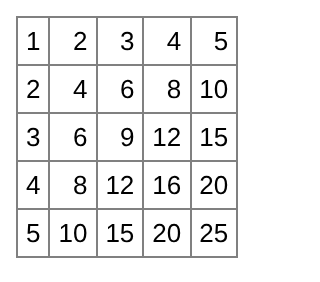
<?php
echo "<table border='1' cellpadding='4' style='border-collapse:collapse;font-family:Arial;font-size:13px'>";
for ($r = 1; $r <= 5; $r++) {
    echo "<tr>";
    for ($c = 1; $c <= 5; $c++) {
        echo "<td align='right'>" . ($r * $c) . "</td>";
    }
    echo "</tr>";
}
echo "</table>";
?>
Key Takeaways
whilechecks the condition first;do…whileruns the body at least once.foris best when the number of repetitions is known: init; condition; increment.foreachwalks through every element of an array, optionally with its key.breakleaves a loop;continuejumps to the next iteration.- Nested loops are used for tables and patterns.
Program File
Extract the ZIP into C:\xampp\htdocs. It creates the folder phpbook/ch07 used in the file labels above; open the programs at http://localhost/phpbook/… with Apache (and MySQL, where needed) started in the XAMPP Control Panel.
Question / Answer (15 questions)
MCQ Test : Check Your Understanding (5 questions)
Select an option and press Check Answer, or answer all questions and press Submit Test to see your score. Each answer comes with an explanation.
Bibliography/References
The notes on this page are the author’s own compilation from the e-book PHP: Basics to Advance. Every program was run on Apache with PHP 8 and MariaDB, and the output shown is the real result of that run. The works listed below were consulted and are cited for attribution and further reading. Product names and trademarks belong to their respective owners.
- The PHP Group. (n.d.). PHP Manual – while. https://www.php.net/manual/en/control-structures.while.php
- The PHP Group. (n.d.). PHP Manual – do-while. https://www.php.net/manual/en/control-structures.do.while.php
- The PHP Group. (n.d.). PHP Manual – for. https://www.php.net/manual/en/control-structures.for.php
- The PHP Group. (n.d.). PHP Manual – foreach. https://www.php.net/manual/en/control-structures.foreach.php
- The PHP Group. (n.d.). PHP Manual – break and continue. https://www.php.net/manual/en/control-structures.break.php