
Learning Objectives – after this chapter you will be able to:
- Explain why regularly updated content brings visitors back to a web site.
- Separate content from design and describe what "content management" means.
- Describe the parts of a CMS: people, roles, rules and the application.
- Outline the publishing workflow and the database design of the CMS project.
- Name popular PHP-based CMS products.
Getting Your Users to Return
Whatever the reason, people these days get bored easily. One of your jobs as a web site administrator is not only to figure out how to get as many people as possible to visit your site, but how to keep them there and keep them coming back.
You can focus on many things to get people to your site, such as word of mouth, advertising and search engines. To keep users on your site, the experts suggest making it easy to navigate, making sure pages load quickly and giving users a personal experience. Getting users to return, however, is how you keep your site going over time.
Take a moment to think about the sites you return to – the ones saved in your browser's bookmarks. Apart from sites you have to visit, what do most of them have in common? Most likely, each site regularly has new information. You might visit a news site every day, check the weather in your area, read your daily horoscope, or follow new posts on a message board. In each case the content is updated regularly – sometimes daily, sometimes weekly, sometimes even hourly. Imagine how much work the developers would have if they had to update all that content by hand every day!
Content
Whatever the subject of your web site, it probably contains lots of content – news, articles, images, user comments and more. You do not want to maintain all that content yourself; it is much better to hand that work to others.
In fact, all a web site developer should ever have to do is maintain the site design itself – update some HTML, change a background colour, fix a bug in the PHP code. The content should be completely separate from the design and should be maintained by other people. Because the content is separate, the content people do not have to know anything about web design! Once the content is separated, you need to decide how to manage it.
Management
If you have a lot of content, entering it into your site will take a lot of work. You need a way to organise it, categorise it and push it to your web site. You will need a number of people, each with a role, working together to create content and mould it into the right form for presentation on the site. You want this process to be efficient, and you need the right tools to do the job.
System
Part IV showed how to create databases and tables and how to build pages that insert, delete, update and retrieve information in those tables. Chapter 31 showed how to authenticate and recognise users by making them log in. With this knowledge you can create a system of web pages that lets users create new content (authors), edit it (editors) and publish it. By assigning users to roles, you control who can use which functions of the site.
Putting It All Together
So you need a group of web pages and tables, and an organised set of rules, that give you the means to gather information, format it and present it to the world. In other words, you need a system to manage your web site content separately from the site design – a Content Management System, or CMS.
There are many degrees of content management. On one site it may simply mean a message board where users post messages to each other. Another site may have reporters in the field writing news stories and sending them in to be published online. Yet another may let users update content and let administrators change the layout of the site, including colours and images.
The term CMS refers not only to the application used to enter content, but also to the people responsible for entering content and to the rules they must follow. Without proper rules, and without the people to make it happen, no CMS application in the world will help you.
Figure 40.1 – The three parts of a CMS
Roles and Workflow
| Role | Can do |
|---|---|
| Reader (guest) | Read published articles. Cannot post. |
| Registered user | Read articles and post comments. |
| Author | Write new articles (saved as pending) and edit his or her own pending articles. |
| Editor / Moderator | Review pending articles, edit them, publish or reject them; delete comments. |
| Administrator | Everything an editor can do, plus manage user accounts and roles. |
Figure 40.2 – Life of an article
The CMS Project of This Book
The CMS application built in Project P1 allows registered users to post articles. These articles are labelled pending until a user with the proper permissions publishes them. Once published, an article shows up as the newest article on the home page. Unregistered users can read articles but cannot post new ones. Registered users can also post comments about an article; when a visitor views a full article, all comments are displayed below it.
The original notes estimated about 20 PHP pages and around 1000 lines of code for such a system: pages for display (home, article, pending articles, review), editing (compose, account, control panel) and transactions, plus include files such as the header and footer. The modern version in Project P1 is more compact because it uses a shared include file, MySQLi prepared statements and sessions – but it follows exactly the same structure.
Database design
| Table | Columns |
|---|---|
| cms_users | user_id, name, email (unique), password (hash), access_level (1 = user, 2 = moderator, 3 = admin), created_on |
| cms_articles | article_id, user_id (author), is_published, submit_date, publish_date, title, body |
| cms_comments | comment_id, article_id, user_id, comment_date, comment |
Content Separate from Design – a Small Demonstration
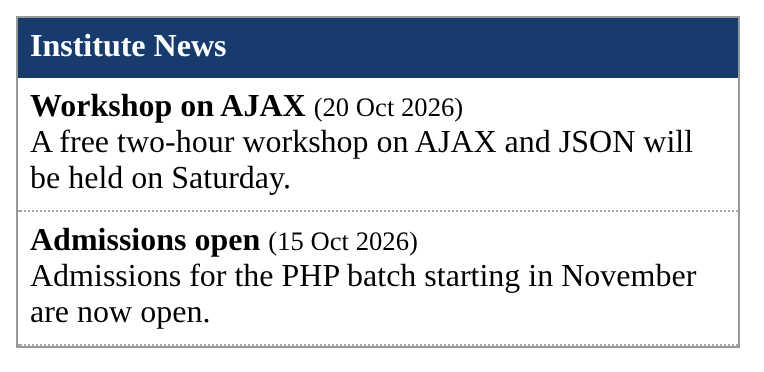
The program below stores two articles in a table and shows them through a template. Changing the look means editing only the template; adding content means only inserting rows – the PHP code does not change.
<div style="font-family:Georgia;width:360px;border:1px solid #999">
  <div style="background:#173b6c;color:#fff;padding:6px"><b><?= $site ?></b></div>
  <?php foreach ($items as $it): ?>
    <div style="padding:6px;border-bottom:1px dotted #aaa">
      <b><?= htmlspecialchars($it['title']) ?></b>
      <small>(<?= date("d M Y", strtotime($it['posted'])) ?>)</small><br>
      <?= htmlspecialchars($it['body']) ?>
    </div>
  <?php endforeach; ?>
</div><?php
$conn = new mysqli("localhost", "root", "", "cmsdemo");
$items = $conn->query("SELECT title, body, posted FROM content ORDER BY posted DESC")
->fetch_all(MYSQLI_ASSOC);
$site = "Institute News";
include "template.php";
?>
Popular PHP Content Management Systems
You do not always have to write your own CMS. Many complete, open source CMS products are written in PHP and run on XAMPP:
- WordPress – the most widely used CMS, originally for blogs, now for all kinds of sites.
- Joomla and Drupal – powerful CMS for community and enterprise sites.
- MediaWiki – the software behind Wikipedia.
XAMPP's download page offers these (through Bitnami add-ons) as installable modules. Studying how your own small CMS works – Project P1 – makes it much easier to understand, customise and extend these products.
Key Takeaways
- Regularly updated content brings visitors back; a CMS makes frequent updates practical.
- Content must be separate from design: developers maintain design, content people maintain content.
- A CMS consists of people, rules and an application.
- Typical roles: reader, registered user, author, editor/moderator, administrator; articles move from pending to published.
- The project CMS uses three tables – users, articles and comments – with MySQLi, sessions and prepared statements.
- WordPress, Joomla, Drupal and MediaWiki are popular PHP CMS products.
Program File
Extract the ZIP into C:\xampp\htdocs. It creates the folder phpbook/ch40 used in the file labels above; open the programs at http://localhost/phpbook/… with Apache (and MySQL, where needed) started in the XAMPP Control Panel.
Question / Answer (15 questions)
MCQ Test : Check Your Understanding (5 questions)
Select an option and press Check Answer, or answer all questions and press Submit Test to see your score. Each answer comes with an explanation.
Bibliography/References
The notes on this page are the author’s own compilation from the e-book PHP: Basics to Advance. Every program was run on Apache with PHP 8 and MariaDB, and the output shown is the real result of that run. The works listed below were consulted and are cited for attribution and further reading. Product names and trademarks belong to their respective owners.
- WordPress.org. (n.d.). WordPress. https://wordpress.org/
- Drupal Association. (n.d.). Drupal. https://www.drupal.org/
- Open Source Matters. (n.d.). Joomla!. https://www.joomla.org/
- Wikipedia contributors. (n.d.). Content management system. Wikipedia, The Free Encyclopedia. https://en.wikipedia.org/wiki/Content_management_system