
Project Objectives – by building this project you will:
- Design the database of a CMS with users, articles and comments.
- Build registration, login, logout and role-based access with sessions and
password_hash(). - Let authors compose articles that stay pending until a moderator publishes them.
- Show published articles on the home page and let registered users comment.
- Use MySQLi object-oriented code with prepared statements throughout.
Synopsis
This project turns the ideas of Chapter 40 into a working application. The CMS allows registered users to post articles. Those articles are labelled pending until a user with the proper permission – a moderator or administrator – publishes them. Once published, an article appears as the newest article on the home page. Unregistered visitors can read articles but cannot post. Registered users can also post comments; when a visitor views a full article, all its comments are displayed below it. An administrator can change the access level of every user.
| Feature | Implemented in |
|---|---|
| Registration and login | register.php, login.php, logout.php (sessions, password_hash(), password_verify()) |
| Shared code | inc/config.php (connection, helpers), inc/header.php, inc/footer.php |
| Home page | index.php – latest published articles |
| Compose | compose.php – new article, saved as pending |
| Moderation | pending.php – list of pending articles; review.php – edit, publish or delete |
| Reading and comments | article.php – full article, comments and comment form |
| Administration | admin.php – users and their access levels |
The pages are stored in htdocs/phpbook/p1. Every database statement that contains outside data is a prepared statement (Chapter 36).
Step 1 – The Database
MariaDB [(none)]> DROP DATABASE IF EXISTS cms;
Query OK, 3 rows affected

MariaDB [(none)]> CREATE DATABASE cms CHARACTER SET utf8mb4 COLLATE utf8mb4_general_ci;
Query OK, 1 row affected

MariaDB [(none)]> USE cms;
Database changed

MariaDB [cms]> CREATE TABLE cms_users (
  user_id      INT AUTO_INCREMENT PRIMARY KEY,
  name         VARCHAR(50)  NOT NULL,
  email        VARCHAR(100) NOT NULL UNIQUE,
  password     VARCHAR(255) NOT NULL,
  access_level TINYINT NOT NULL DEFAULT 1,
  created_on   DATETIME DEFAULT CURRENT_TIMESTAMP
) ENGINE=InnoDB;
Query OK, 0 rows affected

MariaDB [cms]> CREATE TABLE cms_articles (
  article_id   INT AUTO_INCREMENT PRIMARY KEY,
  user_id      INT NOT NULL,
  is_published TINYINT(1) NOT NULL DEFAULT 0,
  submit_date  DATETIME NOT NULL,
  publish_date DATETIME NULL,
  title        VARCHAR(150) NOT NULL,
  body         TEXT NOT NULL,
  FOREIGN KEY (user_id) REFERENCES cms_users(user_id)
) ENGINE=InnoDB;
Query OK, 0 rows affected

MariaDB [cms]> CREATE TABLE cms_comments (
  comment_id   INT AUTO_INCREMENT PRIMARY KEY,
  article_id   INT NOT NULL,
  user_id      INT NOT NULL,
  comment_date DATETIME NOT NULL,
  comment      TEXT NOT NULL,
  FOREIGN KEY (article_id) REFERENCES cms_articles(article_id) ON DELETE CASCADE,
  FOREIGN KEY (user_id) REFERENCES cms_users(user_id)
) ENGINE=InnoDB;
Query OK, 0 rows affected

MariaDB [cms]> SHOW TABLES;
+---------------+
| Tables_in_cms |
+---------------+
| cms_articles  |
| cms_comments  |
| cms_users     |
+---------------+
3 rows in set
access_level stores the role: 1 = user (author), 2 = moderator, 3 = administrator. ON DELETE CASCADE deletes the comments of an article automatically when the article is deleted.
Step 2 – Shared Configuration and Helpers
<?php
session_start();
date_default_timezone_set("Asia/Kolkata");

$db = new mysqli("localhost", "root", "", "cms");
$db->set_charset("utf8mb4");

const LEVELS = [1 => "User", 2 => "Moderator", 3 => "Administrator"];

function e(?string $s): string                       // escape for HTML output
{
    return htmlspecialchars($s ?? "", ENT_QUOTES, "UTF-8");
}
function user(): ?array                              // the logged-in user or null
{
    return $_SESSION["user"] ?? null;
}
function require_level(int $level): void            // protect a page
{
    if (!user() || user()["access_level"] < $level) {
        header("Location: login.php");
        exit;
    }
}
function flash(?string $msg = null): ?string         // one-time message
{
    if ($msg !== null) { $_SESSION["flash"] = $msg; return null; }
    $m = $_SESSION["flash"] ?? null;
    unset($_SESSION["flash"]);
    return $m;
}<!DOCTYPE html>
<html><head><meta charset="utf-8"><title><?= e($title ?? "CMS") ?></title>
<style>
body{font-family:Arial;font-size:13px;margin:0;width:600px}
.top{background:#173b6c;color:#fff;padding:8px} .top a{color:#ffd483;margin-right:8px}
.main{padding:8px} .flash{background:#e7f6ec;border:1px solid #9c9;padding:4px}
.art{border-bottom:1px solid #ccc;padding:4px 0} small{color:#666}
</style></head>
<body>
<div class="top"><b>PHP CMS</b>
<a href="index.php">Home</a>
<?php if (user()): ?>
<a href="compose.php">Compose</a>
<?php if (user()["access_level"] >= 2): ?><a href="pending.php">Pending</a><?php endif; ?>
<?php if (user()["access_level"] >= 3): ?><a href="admin.php">Admin</a><?php endif; ?>
<a href="logout.php">Logout</a>
<small style="color:#fff">(<?= e(user()["name"]) ?>, <?= LEVELS[user()["access_level"]] ?>)</small>
<?php else: ?>
<a href="login.php">Login</a> <a href="register.php">Register</a>
<?php endif; ?>
</div>
<div class="main">
<?php if ($m = flash()): ?><p class="flash"><?= e($m) ?></p><?php endif; ?></div>
<div style="border-top:1px solid #ccc;padding:4px 8px"><small>© <?= date("Y") ?> PHP CMS</small></div>
</body></html>Step 3 – Creating the Administrator
The first account must be an administrator. setup.php is run once and then deleted:
<?php
require "inc/config.php";
$hash = password_hash("Admin@123", PASSWORD_DEFAULT);
$db->execute_query(
    "INSERT INTO cms_users (name, email, password, access_level) VALUES (?, ?, ?, 3)",
    ["Site Admin", "admin@cms.test", $hash]);
echo "Administrator created with id " . $db->insert_id . ". Delete setup.php now!";Administrator created with id 1. Delete setup.php now!
Step 4 – Registration, Login and Logout
<?php
require "inc/config.php";
$errors = [];
if ($_SERVER["REQUEST_METHOD"] === "POST") {
    $name  = trim($_POST["name"] ?? "");
    $email = trim($_POST["email"] ?? "");
    $pass  = $_POST["password"] ?? "";
    if (strlen($name) < 3)                          $errors[] = "Name must have at least 3 characters.";
    if (!filter_var($email, FILTER_VALIDATE_EMAIL)) $errors[] = "Invalid e-mail address.";
    if (strlen($pass) < 8)                          $errors[] = "Password must have at least 8 characters.";
    if (!$errors) {
        try {
            $db->execute_query("INSERT INTO cms_users (name, email, password) VALUES (?, ?, ?)",
                               [$name, $email, password_hash($pass, PASSWORD_DEFAULT)]);
            flash("Registration successful. Please log in.");
            header("Location: login.php");
            exit;
        } catch (mysqli_sql_exception $ex) {
            $errors[] = $ex->getCode() == 1062 ? "This e-mail is already registered." : "Registration failed.";
        }
    }
}
$title = "Register";
require "inc/header.php";
?>
<h3>Register</h3>
<?php foreach ($errors as $er): ?><div style="color:#c00"><?= e($er) ?></div><?php endforeach; ?>
<form method="post">
  Name <input name="name" id="name" value="<?= e($_POST["name"] ?? "") ?>"><br>
  E-mail <input name="email" id="email" value="<?= e($_POST["email"] ?? "") ?>"><br>
  Password <input type="password" name="password" id="password"><br>
  <input type="submit" value="Register" id="go">
</form>
<?php require "inc/footer.php"; ?><?php
require "inc/config.php";
$error = "";
if ($_SERVER["REQUEST_METHOD"] === "POST") {
$row = $db->execute_query("SELECT user_id, name, email, password, access_level
FROM cms_users WHERE email = ?", [$_POST["email"] ?? ""])->fetch_assoc();
if ($row && password_verify($_POST["password"] ?? "", $row["password"])) {
session_regenerate_id(true);
unset($row["password"]); // never keep the hash in the session
$_SESSION["user"] = $row;
flash("Welcome, " . $row["name"] . "!");
header("Location: index.php");
exit;
}
$error = "Wrong e-mail or password.";
}
$title = "Login";
require "inc/header.php";
?>
<h3>Login</h3>
<div style="color:#c00"><?= e($error) ?></div>
<form method="post">
E-mail <input name="email" id="email"> Password <input type="password" name="password" id="password">
<input type="submit" value="Login" id="go">
</form>
<?php require "inc/footer.php"; ?><?php
require "inc/config.php";
$_SESSION = [];
session_destroy();
session_start();
flash("You have been logged out.");
header("Location: index.php");A new user registers (with one mistake first):
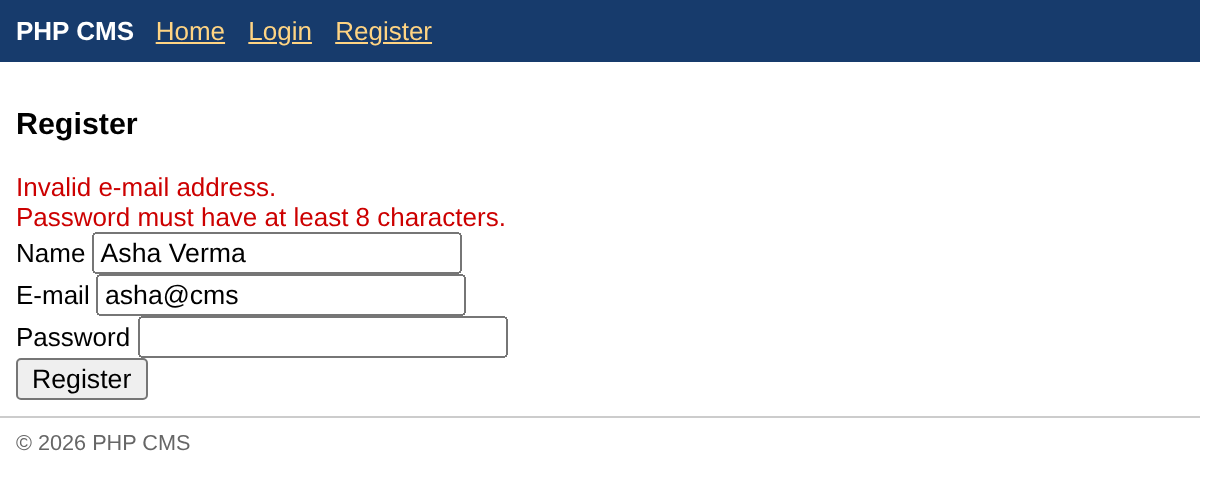
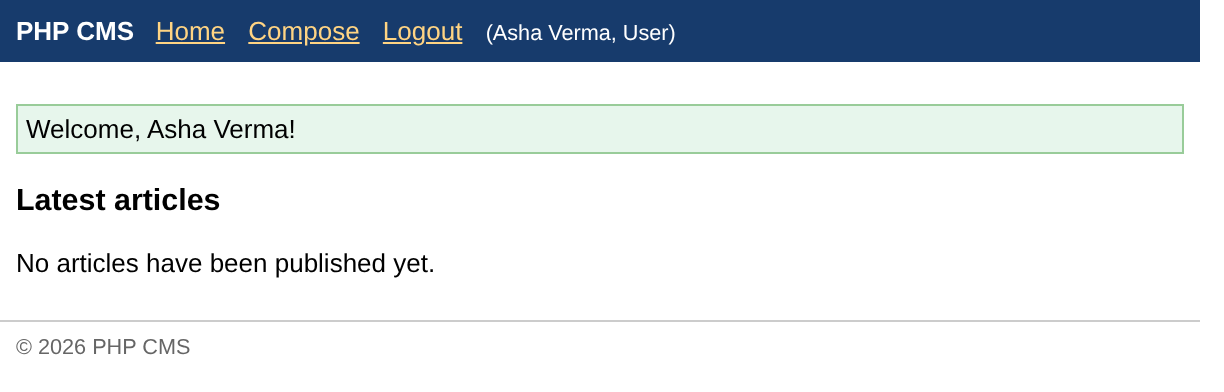
Step 5 – Home Page
<?php
require "inc/config.php";
$articles = $db->query(
    "SELECT a.article_id, a.title, a.body, a.publish_date, u.name,
            (SELECT COUNT(*) FROM cms_comments c WHERE c.article_id = a.article_id) AS comments
     FROM cms_articles a JOIN cms_users u ON a.user_id = u.user_id
     WHERE a.is_published = 1
     ORDER BY a.publish_date DESC LIMIT 10");
$title = "Home";
require "inc/header.php";
?>
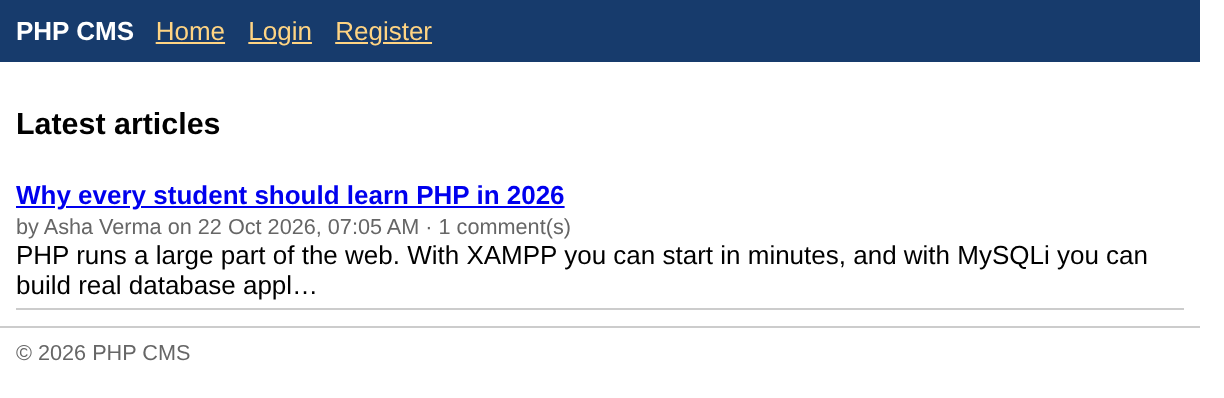
<h3>Latest articles</h3>
<?php if ($articles->num_rows == 0): ?>
  <p>No articles have been published yet.</p>
<?php endif; ?>
<?php foreach ($articles as $a): ?>
  <div class="art">
    <a href="article.php?id=<?= $a["article_id"] ?>"><b><?= e($a["title"]) ?></b></a><br>
    <small>by <?= e($a["name"]) ?> on <?= date("d M Y, h:i A", strtotime($a["publish_date"])) ?>
           · <?= $a["comments"] ?> comment(s)</small><br>
    <?= e(mb_strimwidth($a["body"], 0, 120, "…")) ?>
  </div>
<?php endforeach; ?>
<?php require "inc/footer.php"; ?>
Step 6 – Composing an Article
<?php
require "inc/config.php";
require_level(1);                                    // any logged-in user
$error = "";
if ($_SERVER["REQUEST_METHOD"] === "POST") {
    $t = trim($_POST["title"] ?? "");
    $b = trim($_POST["body"] ?? "");
    if ($t === "" || strlen($b) < 20) {
        $error = "Please enter a title and at least 20 characters of text.";
    } else {
        $db->execute_query("INSERT INTO cms_articles (user_id, submit_date, title, body)
                            VALUES (?, NOW(), ?, ?)", [user()["user_id"], $t, $b]);
        flash("Article #" . $db->insert_id . " submitted. It is pending until a moderator publishes it.");
        header("Location: index.php");
        exit;
    }
}
$title = "Compose";
require "inc/header.php";
?>
<h3>Compose an article</h3>
<div style="color:#c00"><?= e($error) ?></div>
<form method="post">
  Title<br><input name="title" id="title" size="50"><br>
  Text<br><textarea name="body" id="body" rows="5" cols="60"></textarea><br>
  <input type="submit" value="Submit for review" id="go">
</form>
<?php require "inc/footer.php"; ?>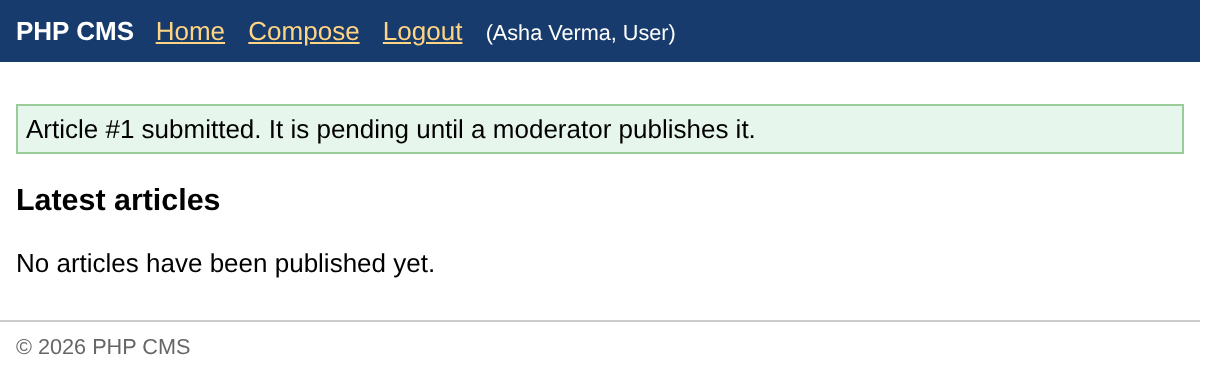
Step 7 – Moderation: Pending Articles and Review
<?php
require "inc/config.php";
require_level(2);                                    // moderators and administrators
$rows = $db->query("SELECT a.article_id, a.title, a.submit_date, u.name
                    FROM cms_articles a JOIN cms_users u ON a.user_id = u.user_id
                    WHERE a.is_published = 0 ORDER BY a.submit_date");
$title = "Pending articles";
require "inc/header.php";
?>
<h3>Pending articles (<?= $rows->num_rows ?>)</h3>
<?php foreach ($rows as $r): ?>
  <div class="art"><a href="review.php?id=<?= $r["article_id"] ?>"><?= e($r["title"]) ?></a>
    <small>by <?= e($r["name"]) ?>, submitted <?= date("d M Y H:i", strtotime($r["submit_date"])) ?></small></div>
<?php endforeach; ?>
<?php require "inc/footer.php"; ?><?php
require "inc/config.php";
require_level(2);
$id = (int) ($_GET["id"] ?? $_POST["id"] ?? 0);
if ($_SERVER["REQUEST_METHOD"] === "POST") {
$action = $_POST["action"] ?? "";
if ($action === "delete") {
$db->execute_query("DELETE FROM cms_articles WHERE article_id = ?", [$id]);
flash("Article deleted.");
header("Location: pending.php");
exit;
}
$db->execute_query("UPDATE cms_articles SET title = ?, body = ? WHERE article_id = ?",
[trim($_POST["title"]), trim($_POST["body"]), $id]);
if ($action === "publish") {
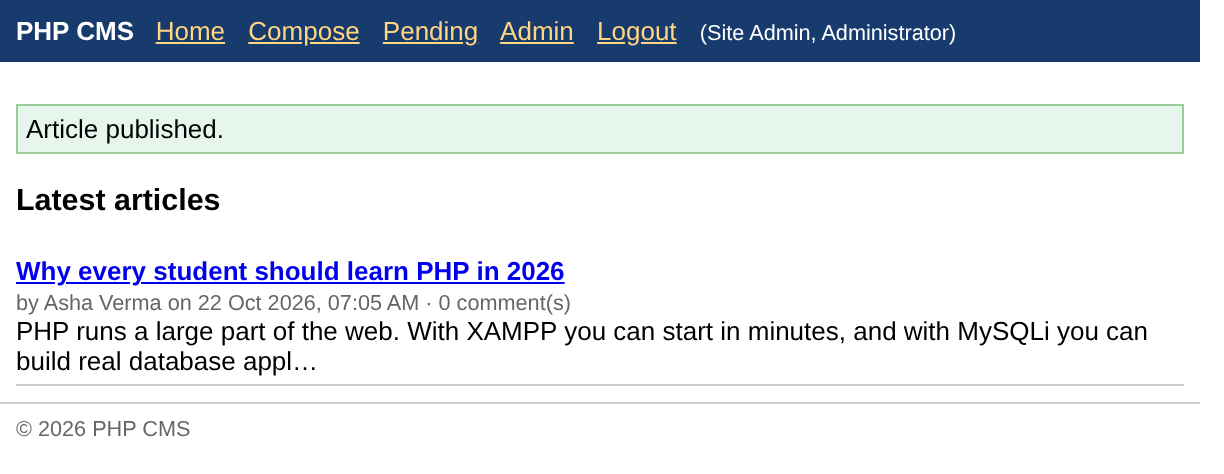
$db->execute_query("UPDATE cms_articles SET is_published = 1, publish_date = NOW()
WHERE article_id = ?", [$id]);
flash("Article published.");
header("Location: index.php");
exit;
}
flash("Changes saved.");
}
$a = $db->execute_query("SELECT * FROM cms_articles WHERE article_id = ?", [$id])->fetch_assoc();
if (!$a) { http_response_code(404); exit("Article not found"); }
$title = "Review";
require "inc/header.php";
?>
<h3>Review article #<?= $id ?> <small>(<?= $a["is_published"] ? "published" : "pending" ?>)</small></h3>
<form method="post">
<input type="hidden" name="id" value="<?= $id ?>">
<input name="title" id="title" size="50" value="<?= e($a["title"]) ?>"><br>
<textarea name="body" id="body" rows="5" cols="60"><?= e($a["body"]) ?></textarea><br>
<button name="action" value="save" id="save">Save</button>
<button name="action" value="publish" id="publish">Publish</button>
<button name="action" value="delete" id="delete">Delete</button>
</form>
<?php require "inc/footer.php"; ?>The administrator logs in and opens the list of pending articles:
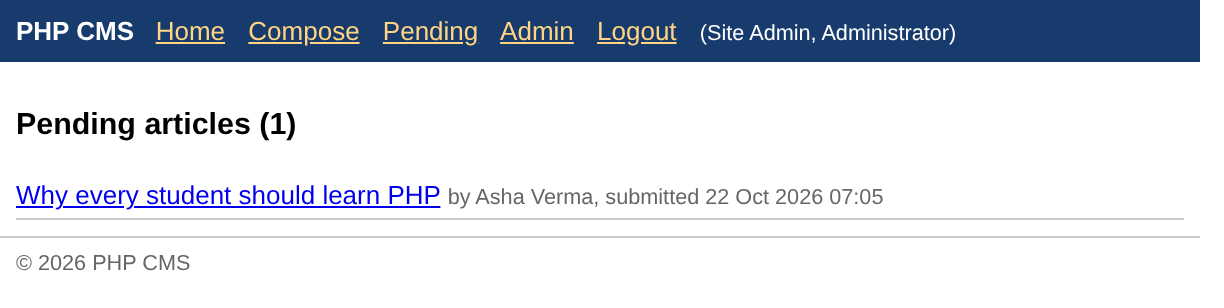
He corrects the title in the review page and publishes the article:
Step 8 – Reading an Article and Commenting
<?php
require "inc/config.php";
$id = (int) ($_GET["id"] ?? 0);
if ($_SERVER["REQUEST_METHOD"] === "POST" && user()) {
    $c = trim($_POST["comment"] ?? "");
    if ($c !== "") {
        $db->execute_query("INSERT INTO cms_comments (article_id, user_id, comment_date, comment)
                            VALUES (?, ?, NOW(), ?)", [$id, user()["user_id"], $c]);
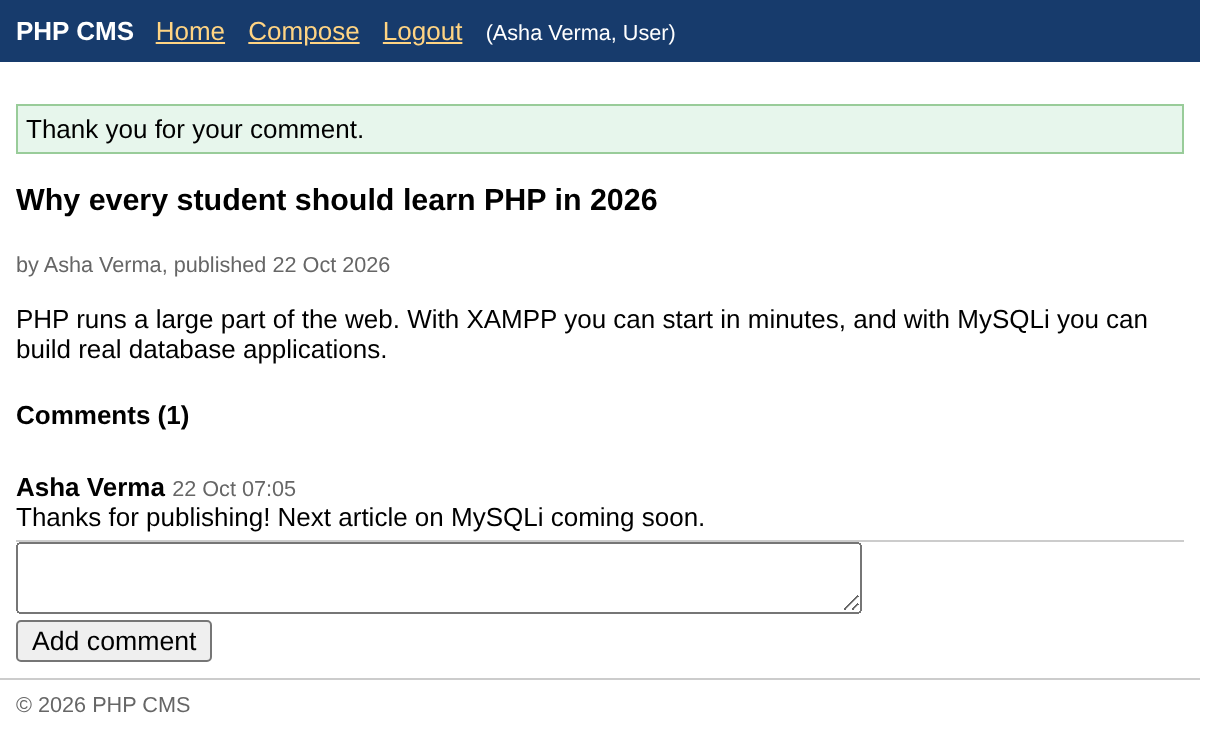
        flash("Thank you for your comment.");
    }
    header("Location: article.php?id=$id");          // Post/Redirect/Get
    exit;
}
$a = $db->execute_query("SELECT a.*, u.name FROM cms_articles a JOIN cms_users u USING (user_id)
                         WHERE a.article_id = ? AND a.is_published = 1", [$id])->fetch_assoc();
if (!$a) { http_response_code(404); exit("Article not found"); }
$comments = $db->execute_query("SELECT c.comment, c.comment_date, u.name
                                FROM cms_comments c JOIN cms_users u USING (user_id)
                                WHERE c.article_id = ? ORDER BY c.comment_date", [$id]);
$title = $a["title"];
require "inc/header.php";
?>
<h3><?= e($a["title"]) ?></h3>
<small>by <?= e($a["name"]) ?>, published <?= date("d M Y", strtotime($a["publish_date"])) ?></small>
<p><?= nl2br(e($a["body"])) ?></p>
<h4>Comments (<?= $comments->num_rows ?>)</h4>
<?php foreach ($comments as $c): ?>
  <div class="art"><b><?= e($c["name"]) ?></b> <small><?= date("d M H:i", strtotime($c["comment_date"])) ?></small><br>
  <?= e($c["comment"]) ?></div>
<?php endforeach; ?>
<?php if (user()): ?>
  <form method="post"><textarea name="comment" id="comment" rows="2" cols="50"></textarea><br>
  <input type="submit" value="Add comment" id="go"></form>
<?php else: ?>
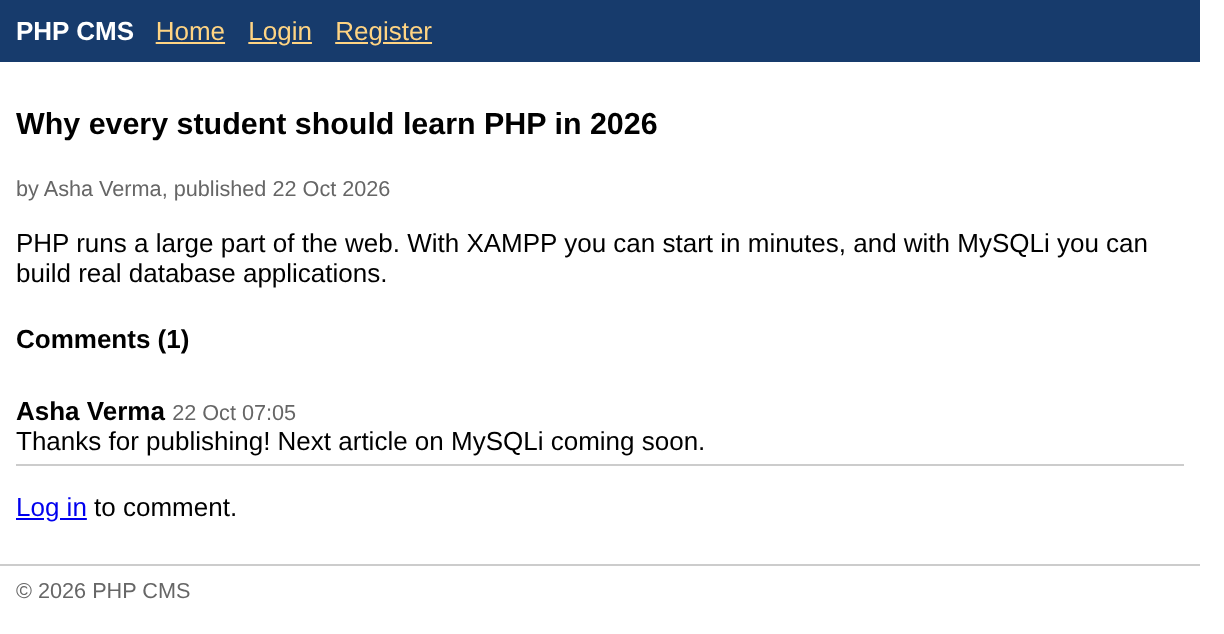
  <p><a href="login.php">Log in</a> to comment.</p>
<?php endif; ?>
<?php require "inc/footer.php"; ?>
Asha logs in again, opens her published article and adds a comment:
A visitor who is not logged in can read the article and the comments but sees no comment form:
Step 9 – User Administration
<?php
require "inc/config.php";
require_level(3);                                    // administrators only
if ($_SERVER["REQUEST_METHOD"] === "POST") {
    $uid = (int) $_POST["user_id"];
    $lvl = (int) $_POST["access_level"];
    if (isset(LEVELS[$lvl]) && $uid != user()["user_id"]) {      // cannot demote yourself
        $db->execute_query("UPDATE cms_users SET access_level = ? WHERE user_id = ?", [$lvl, $uid]);
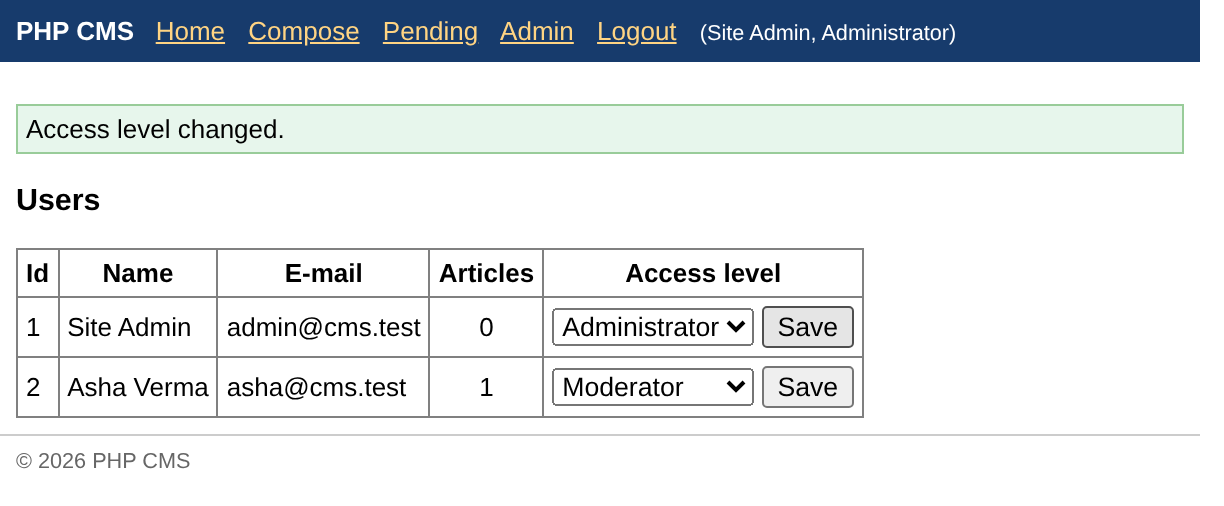
        flash("Access level changed.");
    }
    header("Location: admin.php");
    exit;
}
$users = $db->query("SELECT u.user_id, u.name, u.email, u.access_level,
                     (SELECT COUNT(*) FROM cms_articles a WHERE a.user_id = u.user_id) AS articles
                     FROM cms_users u ORDER BY u.user_id");
$title = "Admin";
require "inc/header.php";
?>
<h3>Users</h3>
<table border="1" cellpadding="4" style="border-collapse:collapse">
<tr><th>Id</th><th>Name</th><th>E-mail</th><th>Articles</th><th>Access level</th></tr>
<?php foreach ($users as $u): ?>
<tr><td><?= $u["user_id"] ?></td><td><?= e($u["name"]) ?></td><td><?= e($u["email"]) ?></td>
  <td align="center"><?= $u["articles"] ?></td>
  <td><form method="post" style="margin:0">
        <input type="hidden" name="user_id" value="<?= $u["user_id"] ?>">
        <select name="access_level" id="lvl<?= $u["user_id"] ?>">
          <?php foreach (LEVELS as $k => $v): ?>
            <option value="<?= $k ?>" <?= $k == $u["access_level"] ? "selected" : "" ?>><?= $v ?></option>
          <?php endforeach; ?>
        </select> <input type="submit" value="Save" id="save<?= $u["user_id"] ?>">
      </form></td></tr>
<?php endforeach; ?>
</table>
<?php require "inc/footer.php"; ?>
The administrator promotes Asha to moderator:
Finally, the home page as every visitor sees it:
Testing the Security
PHP CMS   Home Login Register
Login
E-mail  Password
© 2026 PHP CMS
MariaDB [cms]> SELECT user_id, name, LEFT(password, 7) AS hash_start, access_level FROM cms_users;
+---------+------------+------------+--------------+
| user_id | name       | hash_start | access_level |
+---------+------------+------------+--------------+
|       1 | Site Admin | $2y$10$    |            3 |
|       2 | Asha Verma | $2y$10$    |            2 |
+---------+------------+------------+--------------+
2 rows in set

MariaDB [cms]> SELECT article_id, is_published, title FROM cms_articles;
+------------+--------------+--------------------------------------------+
| article_id | is_published | title                                      |
+------------+--------------+--------------------------------------------+
|          1 |            1 | Why every student should learn PHP in 2026 |
+------------+--------------+--------------------------------------------+
1 row in set

MariaDB [cms]> SELECT comment_id, article_id, user_id, LEFT(comment, 32) AS comment FROM cms_comments;
+------------+------------+---------+----------------------------------+
| comment_id | article_id | user_id | comment                          |
+------------+------------+---------+----------------------------------+
|          1 |          1 |       2 | Thanks for publishing! Next arti |
+------------+------------+---------+----------------------------------+
1 row in set
The passwords are stored only as bcrypt hashes, roles are stored as access levels, and every page checks the level with require_level().
Ideas for Extending the Project
- Add categories and a search box (a
LIKEquery with a prepared statement). - Add pagination to the home page with
LIMIT offset, count(Chapter 32). - Let moderators delete comments and authors edit their own pending articles.
- Upload an image with each article (Chapter 14) and store the file name in the table.
- Provide an RSS feed of the latest articles in XML (Chapter 38) or a JSON API (Chapter 39).
- Protect forms against Cross-Site Request Forgery with a random token stored in the session.
Key Takeaways
- The CMS uses three tables – users, articles (pending/published) and comments – linked by foreign keys.
inc/config.phpholds the connection, session start and helpers (e(),user(),require_level(),flash()).- Passwords are stored with
password_hash()and checked withpassword_verify(); the session id is regenerated at login. - Articles are inserted as pending; moderators publish them with an UPDATE that sets
is_publishedandpublish_date. - All outside data reaches the database through prepared statements (
execute_query()), and all output is escaped withhtmlspecialchars(). - Access levels decide which menu items appear and which pages may be opened.
Program File
Extract the ZIP into C:\xampp\htdocs. It creates the folder phpbook/p1 used in the file labels above; open the programs at http://localhost/phpbook/… with Apache (and MySQL, where needed) started in the XAMPP Control Panel.
Question / Answer (15 questions)
MCQ Test : Check Your Understanding (5 questions)
Select an option and press Check Answer, or answer all questions and press Submit Test to see your score. Each answer comes with an explanation.
Bibliography/References
The notes on this page are the author’s own compilation from the e-book PHP: Basics to Advance. Every program was run on Apache with PHP 8 and MariaDB, and the output shown is the real result of that run. The works listed below were consulted and are cited for attribution and further reading. Product names and trademarks belong to their respective owners.
- The PHP Group. (n.d.). PHP Manual – mysqli::execute_query. https://www.php.net/manual/en/mysqli.execute-query.php
- The PHP Group. (n.d.). PHP Manual – Password Hashing. https://www.php.net/manual/en/book.password.php
- The PHP Group. (n.d.). PHP Manual – Sessions. https://www.php.net/manual/en/book.session.php
- OWASP Foundation. (n.d.). Cross-Site Request Forgery Prevention Cheat Sheet. https://cheatsheetseries.owasp.org/cheatsheets/Cross-Site_Request_Forgery_Prevention_Cheat_Sheet.html
- MariaDB Foundation. (n.d.). FOREIGN KEY. MariaDB Knowledge Base. https://mariadb.com/kb/en/foreign-keys/